Thursday, July 31, 2014


Monday, July 28, 2014







This tutorial is written for those with knowledge of PSP
Supplies Needed:
Tube of choice: I'm using the wonderful art work of Keith Garvey
You can purchase his tubes at Garv - Girls PSP HERE
Template #99 by Yvette HERE
Mask of choice
Don't forget to leave a thank you when downloading
Xero Radiance
Open template - Shift D to duplicate then close out original
Canvas size 700x700
Delete copyright & next 4 layers
Dropshadow as you wish
new layer & paste paper 7 into selection
select none delete the original
add new layer & flood fill with red color
select none delete the original
new layer & paste paper 2 into selection
select none delete the original
Open W1 & place to far right of template
Open W33 - resize 86% and place next to tree up close to middle
Open W6 - resize 50% and place at bottom of tree
Open W5 - resize 50% and place in front of other flower
Open W37 - resize 58% and place next to flower toward left
Open W41 - resize 80% and place to far left of template
Open W24 - resize 75% and place beside the cups
Open W51 and place in front of cups & cupcake
Open W12 - resize 28% and place in front of hat
Open tube - resize as needed and place to right of tag
Apply Xero Radiance with settings of choice
Open W28 - resize 68% and place at bottom of tag to right
Open W3 & W13 - resize 25% and place at top of tag to your liking
Open paper 1 & apply mask of choice
Add the Copyright and your License Number for the tube
Resize to your liking and save as PNG
This tutorial was created on July 10,2014 by Rhonda
Any resemblance to another Tag or Tutorial is purely coincidental

This tutorial is written for those with knowledge of PSP
Supplies Needed:
Tube of choice: I'm using the wonderful art work of Andy Cooper
You must obtain a license to use his art at S&Co HERE
Matching PTU Scrapkit by DNScraps HERE
Mask of choice
This is a very quick and easy tutorial
Open blank canvas 700x700
Open framewood and place to top left
Rotate slightly to the left
Grab the magic wand & click inside frame
Selections modify expand by 10
Add new layer under frame
Open paper 5 & paste into selections
Open goldenframe and place to right bottom
Rotate slightly to the right
Grab the magic wand & click inside frame
Selections modify expand by 10
Add new layer under frame
Open paper 9 & paste into selections
I used:
Bird
Castle
Cat
Cloud
Book
Dragonfly
Genius
Glass
Walk
Lamp
Leaves
Stars
Teapot
Open paper 10 & apply mask of choice
Add the Copyright and your License Number for the tube
Resize to your liking and save as PNG
This tutorial was created on July 28,2014 by Rhonda
Any resemblance to another Tag or Tutorial is purely coincidental
Saturday, July 19, 2014

This tutorial is written for those with knowledge of PSP
Supplies Needed:
Tube of choice: I'm using the wonderful art work of Danny Lee
You must obtain a license to use his art at S&Co HERE
Matching PTU Scrapkit by Disturbed Scraps HERE
Mask #55 by Rosesblack HERE
This is a very quick and easy tutroial
Open element 106 & place in center toward left
Grab the magic wand & click inside frame
Selections modify expand by 10
Add new layer under frame
Open paper 11 & paste into selections
I used:
Element 8
Element 17
Element 30
Element 36
Element 41
Element 52
Element 55
Element 65
Element 66
Element 69
Element 72
Element 85
Element 90
Open paper 6 & apply mask of choice
Add the Copyright and your License Number for the tube
Resize to your liking and save as PNG
This tutorial was created on July 19,2014 by Rhonda
Any resemblance to another Tag or Tutorial is purely coincidental
Friday, July 18, 2014

Shelly tried my Sailor Girl tutorial & sent me the results
Thursday, July 17, 2014

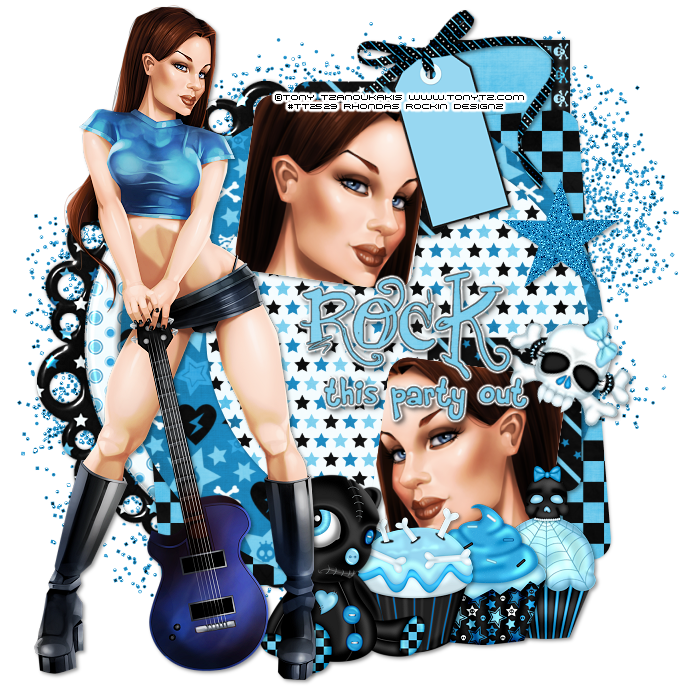
This tutorial is written for those with knowledge of PSP
Supplies Needed:
Tube of choice: I'm using the wonderful art work of Spazzd Art
Which you must obtain a license to use HERE
PTU Scrap Kit by Purple Dream Scraps called Let's Rock
You an purchase this awesome kit HERE
Template #344 by Divine Intentionz HERE
Mask of choice
Don't forget to leave a thank you when downloading
Xero Radiance
Open template - Shift D to duplicate then close out original
Resize template 90% all layers
Canvas 700x700
deleted copyright,wordart,thin rectangle,dotted line & hearts
paste a paper of choice from the kit - I used paper6
selection invert delete
select none delete the original
paste a paper of choice from the kit - I used paper11
selection invert delete
select none delete the original
add new layer & paste color of choice
add noise with settings of choice
select none delete the original
paste a paper of choice from the kit - I used paper9
selection invert delete
select none delete the original
paste a paper of choice from the kit - I used paper1
selection invert delete
select none delete the original
paste a paper of choice from the kit - I used paper4
selection invert delete
select none delete the original
add new layer & paste color of choice
select none delete the original
Add noise with settings of choice
paste close-up of tube inside circle
selection invert delete
select none delete the original
apply Xero Radiance with default settings
Xero Radiance with settings of choice
I used the following:
Beads
CD
Cupcake
Guitar
Headphones
Ipod
Ipod 2
Keyboard
Sparkles
Speakers
Open paper of choice & apply mask
Add the Copyright and your License Number for the tube
Resize to your liking and save as PNG
This tutorial was created on July 17,2014 by Rhonda
Any resemblance to another Tag or Tutorial is purely coincidental
Monday, July 14, 2014

This tutorial is written for those with knowledge of PSP
Supplies Needed:
Tube of choice: I'm using the wonderful art work of The Hunter
You must obtain a license to use his art at S&Co HERE
Matching PTU Scrapkit by Designs by Joan HERE
Mask of choice
Xero Radiance
It is a must have kit!!!!!!!!!!!!!!
This is a very quick and easy tutroial
Open element 39 & place in center of tag
Grab the magic wand & click inside frame
Selections modify expand by 10
Add new paper under frame
Open paper 5 & paste into selections
apply Xero Radiance with settings of choice
I used:
Element 6
Element 9
Element 27
Element 28
Element 44
Element 52
Element 56
Element 73
Element 87
Open paper 2 & apply mask of choice
Add the Copyright and your License Number for the tube
Resize to your liking and save as PNG
This tutorial was created on July 14,2014 by Rhonda
Any resemblance to another Tag or Tutorial is purely coincidental
Sunday, July 13, 2014



This tutorial is written for those with knowledge of PSP
Supplies Needed:
Tube of choice: I'm using the wonderful art work of Danny Lee
You can purchase his tubes at S&C HERE
PTU Scrap Kit by Purple Dream Scraps called Devils Blood
You can purchase this awesome kit HERE
Mask #59 by Millie HERE
Open a blank image 700x700
Open frame 3 and place as a new image
Resize and rotate 90 to the left
Duplicate image mirror
Merge the frames as one
Grab the magik wand and click inside frame
Select modify expand by 5
Open paper 5 and place as a new layer
selections invert - delete
Xero Radiance with settings of choice
I used the following:
Decor
Glitter
Handprint
Knife
Leaves 2
Lightening
Roses
Skull
Skull Cross
Sparkles
Spider
Spider 2
Vine
Open paper of choice and apply mask
Add the Copyright and your License Number for the tube
Resize to your liking and save as PNG
This tutorial was created on July 13,2014 by Rhonda
Any resemblance to another Tag or Tutorial is purely coincidental
Subscribe to:
Posts
(Atom)
Grab My Blinkie

I CT For



Blogs I Visit
























