Showing posts with label Chichi Designz. Show all posts
Showing posts with label Chichi Designz. Show all posts
Friday, February 18, 2022


Tuesday, October 8, 2013

Supplies Needed:
Tube of choice: Im using the wonderful art work of Alex Prihodko
Which you must obtain a license to use at PFD HERE
PTU Scrap Kit by Cindy from Chichi Designz's called "EnamorteOct2013"
You an purchase this awesome kit HERE
Mask of choice
Open blank 700x700 canvas
Open frame 2 & place in center of canvas
Resize 85% and rotate frame 90 degrees to right
Click inside frame with magic wand
Selections modify expand by 5
Open paper 3 and paste under frame
Selections invert delete
I used the following:
Bird
Cluster
Moon
Pumpkins
Scarecrow
Scenery
Spiderweb
Woodlogs
Open paper 1 & apply mask
Add the Copyright and your License Number for the tube
Resize to your liking and save as PNG
This tutorial was created on October 9,2013 by Rhonda
Any resemblance to another Tag or Tutorial is purely coincidental

Thursday, September 19, 2013

Supplies Needed:
Tube of choice: Im using the wonderful art work of Unholy Vault
This artist allows her work to be used freely in tutorials
You can find her site HERE
You can read about her free tubes HERE
PTU Scrap Kit by Cindy from Chichi Designz's called "IB Tiffany TolandScott 2-2"
You an purchase this awesome kit HERE
Mask #18 by Gems HERE
Open blank 700x700 canvas
Open ruins & place in center of canvas
Place your main tube where desired on tag
I used the following:
Cat
Dragonflies
Flowers
grass Skulls
Lantern
Leaves
Leaves 2
Rose&Thorns
Star Sparkles
Tree Wordart
Open paper 1 & apply mask
Add the Copyright and your License Number for the tube
Resize to your liking and save as PNG
This tutorial was created on September 19,2013 by Rhonda
Any resemblance to another Tag or Tutorial is purely coincidental
Wednesday, September 4, 2013
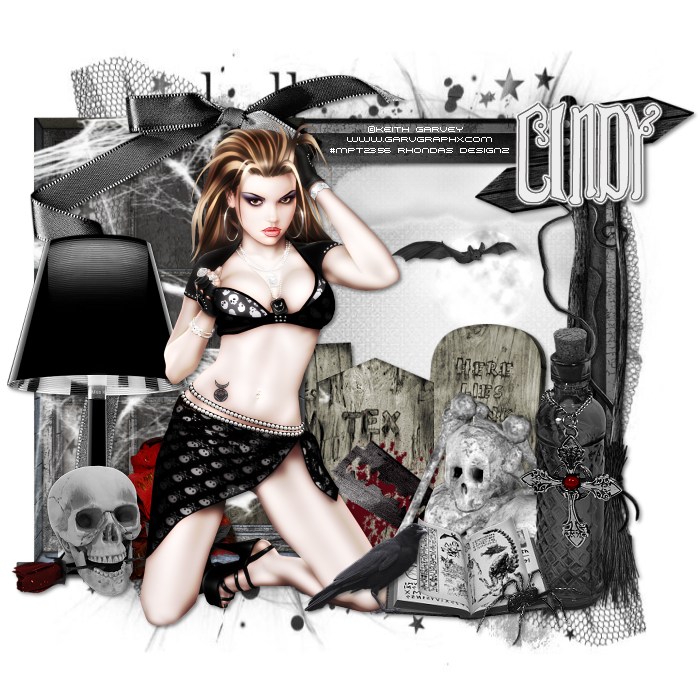
Supplies Needed:
Tube of choice: Im using the wonderful art work of Keith Garvey
This tube was purchased at MPT which has closed
You must obtain a license to use at his store HERE
PTU Scrap Kit by Cindy from Chichi Designz's called "Creeped"
You an purchase this awesome kit HERE
Halloween Mask #1 HERE
Xero Radiance
Open blank 700x700 canvas
Open creeped frame and move to right of canvas
Resize frame to your liking
Click inside frame with magic wand
Selections modify expand by 5
Open paper 14 and paste under frame
Selections invert delete
Open window and place to left of canvas
Join the window & frame so it looks like 1
apply Xero Radiance with settings of choice
I used the following:
Bat
Blood Blade
Bottle 1
Bow
Broom
Cloud
Cloud 1
Crow
Lamp
Rose 1
Signs
Skull Rose
SkullNBones
Spellbook
Spider
Tombstones
Web
Open paper 3 & apply mask of choice
Add the Copyright and your License Number for the tube
Resize to your liking and save as PNG
This tutorial was created on September 4,2013 by Rhonda
Any resemblance to another Tag or Tutorial is purely coincidental
Friday, August 30, 2013

Supplies Needed:
Tube of choice: Im using the wonderful art work of Jessica Dougherty
This tube was purchased at CILM which has closed
You can purchase her art at CDO HERE
PTU Scrap Kit by Cindy from Chichi Designz's called "Autumn Calling"
You an purchase this awesome kit HERE
Open blank 700x700 canvas
Open frame and rotate 90 degrees to left
Grab the magic wand and click inside frame
Selections modify expand by 10
Open paper 2 and paste as new layer
Selections invert delete
Move paper under frame
Apply PhotoEffex with settings of choice
apply Xero Radiance with settings of choice
I used the following:
Bird
Brush Sparkle
Fence
Flower 1
Flower Branch
Flower Leaves
Leaves
Mushrooms
Pumpkin
Squirrel
Sparkles
Sunflower
Tree
Walnuts
Web
Add the Copyright and your License Number for the tube
Resize to your liking and save as PNG
This tutorial was created on August 30,2013 by Rhonda
Any resemblance to another Tag or Tutorial is purely coincidental
Thursday, August 22, 2013

Supplies Needed:
Tube of choice: Im using the wonderful art work of Amy Matthews
You can purchase her art at CDO HERE
PTU Scrap Kit by Cindy from Chichi Designz's called "IB Anna Marine 7-2"
You an purchase this awesome kit HERE
Sparkle Mask from Farm Fresh Designs HERE
Open blank 700x700 canvas
Open arch & place in center
Open scenery and place at bottom of arch
Grab the freehand tool & draw around arch& scenery
Open paper 4 and paste as new layer
Selections invert delete
Move paper under arch & scenery
I used the following:
Branch
Butterflies 2
Clouds
Fog
Lantern
Roses
Open paper 3 and apply mask
Add the Copyright and your License Number for the tube
Resize to your liking and save as PNG
This tutorial was created on August 22,2013 by Rhonda
Any resemblance to another Tag or Tutorial is purely coincidental
Tuesday, August 13, 2013

Supplies Needed:
Tube of choice: Im using the wonderful art work of Ismael Rac
Which you must obtain a license to use at his store HERE
PTU Scrap Kit by Cindy from Chichi Designz's called "IB Ted Hammond 27-3"
You an purchase this awesome kit HERE
Mask of choice
Xero Radiance
Open blank 700x700 canvas
Open frame 1 & place in center of canvas - resize to liking
Click inside cluster frame with magic wand
Selections modify expand by 5
Open paper 3 and paste under frame
Selections invert delete
apply Xero Radiance with settings of choice
I used the following:
Bottle
Cauldron
Lantern
Moon
Moss
Rose
Skulls
Spider
Web
Open paper 5 & apply mask of choice
Add the Copyright and your License Number for the tube
Resize to your liking and save as PNG
This tutorial was created on August 13,2013 by Rhonda
Any resemblance to another Tag or Tutorial is purely coincidental
Thursday, August 8, 2013

Supplies Needed:
Tube of choice: Im using the wonderful art work of Elias Chatzoudis
Which you must obtain a license to use at hos store HERE
PTU Scrap Kit by Cindy from Chichi Designz's called "IB Elizabeth Austin 14-2"
You an purchase this awesome kit HERE
Xero Radiance
Open blank 700x700 canvas
Open frame 2 & place in center of canvas
Click inside cluster frame with magic wand
Selections modify expand by 5
Open paper 3 and paste under frame
Selections invert delete
apply Xero Radiance with settings of choice
I used the following:
Bird
Butterflies
Cloud
Flower 1
Flower Brush
Flowers 1&2
Grass
Lantern
Sparkles
Swirl Sparkles
Add the Copyright and your License Number for the tube
Resize to your liking and save as PNG
This tutorial was created on August 8,2013 by Rhonda
Any resemblance to another Tag or Tutorial is purely coincidental
Thursday, July 11, 2013

Supplies Needed:
Tube of choice: Im using the wonderful art work of Alex Prihodko
Which you must obtain a license to use at PFD HERE
PTU Scrap Kit by Cindy from Chichi Designz's called "IB Rachel Anderson 4-2"
You an purchase this awesome kit HERE
Mak #83 from Rosesblack HERE
Don't forget to leave a thank you when downloading
Xero Radiance
Penta Dot and Cross
Open blank 700x700 canvas
Open cluster frame - resize 85%
Position frame to left of tag
Click inside cluster frame with magic wand
Selections modify expand by 5
Open paper 1 and paste under frame
Selections invert delete
Move paper under frame
apply Xero Radiance with settings of choice
I used the following:
Bow
Brush
Cloud
Dandelion Seeds
Flower
Flower 1&2
Glitters
Grass
Snail
Open paper 2 & apply mask
Duplicate mask layer then merge the 5 together
apply Penta Dot and Cross
Add the Copyright and your License Number for the tube
Resize to your liking and save as PNG
This tutorial was created on July 11,2013 by Rhonda
Any resemblance to another Tag or Tutorial is purely coincidental
Tuesday, July 9, 2013

Supplies Needed:
Tube of choice: Im using the wonderful art work of Pinup Toons
This tube was purchased at CILM which has closed
You can purchase her art now at CDO HERE
PTU Scrap Kit by Cindy from Chichi Designz's called "Ice Cream Chocolate"
You an purchase this awesome kit HERE
Open blank 700x700 canvas
Open frame 2 - resize 85%
Open cluster frame - resize 85%
Click inside cluster frame with magic wand
Selections modify expand by 5
Open paper 1 and paste under frame
Selections invert delete
Move paper under frame
I used the following:
Bird
Bow
Chocolate
Chocolate Bar
Chocolates
Chocolates 2
Chocolate Strawberry
Coffee Can
Cup
Ice Cream 1&2
Lips
Mask
Ribbon
Sparkles
Wordart 2
Add the Copyright and your License Number for the tube
Resize to your liking and save as PNG
This tutorial was created on July 9,2013 by Rhonda
Any resemblance to another Tag or Tutorial is purely coincidental
Thursday, June 27, 2013

Supplies Needed:
Tube of choice: Im using the wonderful art work of Jennifer Janesko
This tube was purchased at CILM which has closed
You can purchase her art now at CDO HERE
PTU Scrap Kit by Cindy from Chichi Designz's IB-Jennifer Janesko 137-3
You an purchase this awesome kit HERE
Top Template by Jackie Scottish Lass HERE
Mask of choice
Don't forget to leave a thank you when downloading
Open template - Shift D to duplicate then close out original
Resize template 115% all layers
delete copyright layer & raster 3 layer
paste a paper of choice from the kit - I used paper1
selection invert delete
select none delete the original
rotate papers from kit in the rectangles
selection invert delete
select none delete the original
I used the following:
Bird
Brush
Butterflies
Butterfly
Fan
Flowers 1
Flowers
Harp
HeartBrush
KeyBow
Lace 2
Musicpaper
Pillow
Wordart
Add the Copyright and your License Number for the tube
Resize to your liking and save as PNG
This tutorial was created on June 27,2013 by Rhonda
Any resemblance to another Tag or Tutorial is purely coincidental
Sunday, June 16, 2013

Supplies Needed:
Tube of choice: Im using the wonderful art work of Jennifer Janesko
This tube was bought at CILM which has closed
You can now purchase her work at CDO HERE
PTU Scrap Kit by Cindy from Chichi Designz's IB-Jennifer Janesko 71-3
You an purchase this awesome kit HERE
Mask of choice
Xero Radiance
Open blank 700x700 canvas
Open frame 1 - paste as new layer
Place your main tube in frame
Apply Xero Radiance with settings of choice
Duplicate tube and move above frame
Erase any parts hanging out of frame on bottom
Open music sheets amd place to top inside of frame
Duplicate and mirror
Open cluster and move behind tube
I used the following:
Bow 2
Butterfly
Parrot
Ribbon
Sparkles
Wordart
Open paper 2 & apply mask
Add the Copyright and your License Number for the tube
Resize to your liking and save as PNG
This tutorial was created on June 16,2013 by Rhonda
Any resemblance to another Tag or Tutorial is purely coincidental
Wednesday, June 5, 2013

Supplies Needed:
Tube of choice: Im using the wonderful art work of Sonia Roji
Which you must obtain a license to use at CDO HERE
PTU Scrap Kit by Cindy from Chichi Designz's IB-Amy Matthews 17-1
You an purchase this awesome kit HERE
Mask #271 by Insatiable Dreams HERE
Don't forget to leave a thank you when downloading
Penta Color Dot
Xero Radiance
Eyecandy 4000 Gradient Glow
Open blank 700x700 canvas
Open cluster frame - resize 72%
Duplicate frame and place side by side
Use the eraser tool to make the frame appear as 1 frame
Grab the freehand tool and draw around frame
Open paper 7 and paste under frame
Selections invert delete
Apply Penta Color Dot with settings of choice
Apply Xero Radiance with settings of choice
I used the following:
Brush
Fan
Flower
Flowers
Ribbon 2
Swirl
Wordart
Open paper 3 & apply mask
Add the Copyright and your License Number for the tube
Resize to your liking and save as PNG
This tutorial was created on June 4,2013 by Rhonda
Any resemblance to another Tag or Tutorial is purely coincidental
Monday, June 3, 2013

Supplies Needed:
Tube of choice: Im using the wonderful art work of VeryMany
Which you must obtain a license to use at their store HERE
PTU Scrap Kit by Cindy from Chichi Designz's IB-Jessica Dougherty 42-2
You an purchase this awesome kit HERE
Mask of choice
Xero Fritillary
Xero Radiance
Eyecandy 4000 Gradient Glow
Open blank 700x700 canvas
Open frame 2 - resize 84%
Open cluster frame - resize 85%
Duplicate frame 2
Place on each side of cluster frame
Click inside cluster frame with magic wand
Selections modify expand by 10
Open paper 1 and paste under frames
Selections invert delete
Apply Xero Radiance with settings of choice
I used the following:
Bubbles
Cuffs
Shoe
Sparkles
Whip
Wordart Shadowed
Open paper 4 & apply mask
Add the Copyright and your License Number for the tube
Resize to your liking and save as PNG
This tutorial was created on June 4,2013 by Rhonda
Any resemblance to another Tag or Tutorial is purely coincidental
Subscribe to:
Posts
(Atom)
Grab My Blinkie

I CT For



Blogs I Visit
























