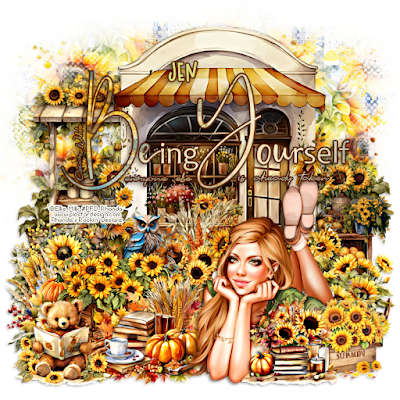
This tutorial is written for those with knowledge of PSPSupplies Needed:Tube of choice: I'm using the wonderful artwork of Ellie_MilkExclusive tube purchased at PFD HEREPTU kit by Jen from Jen's Sweet Temptations called Sunflower PowerKit can be purchased HERE.All kits 50% off at time of this postingMask of choiceWA of choice
Ok let's get started:Open blank canvas 725x725Open element 94 and place to center, resize if you choose.Open element 12 and place to left side behind element 94 near topOpen element 14 and place to right side behind element 94 near bottomOpen tube of choice & paste on canvas
Use any elements of choice. I used the following:Element 1Element 4Element 5Element 9Element 19Element 20Element 29Element 50Element 51Element 62Element 69Element 82Element 89Element 90
Merge layers or keep layers open to use laterOpen paper of choice and apply mask
Place your name where you like itAdd the Copyright and your License Number for the tubeResize to your liking and save as PNGThis tutorial was created on November 15,2023 by RhondaAny resemblance to another Tag or Tutorial is purely coincidental
This tutorial is written for those with knowledge of PSPSupplies Needed:Tube of choice: I'm using the wonderful artwork of Elias ChatzoudisTube was purchased at CDO HEREPTU kit by Jens Sweet Temptations called Turkey DayKit can be purchased at her store HEREJen is having a 50% off sale at time of this postingMask #66 from Moonbeams & Spiderwebs HERECheck out rest of the goodies offered on blog
Ok let's get started:Open blank canvas 725x725Open element 20 & place to center close to top Open tube of choice and place to left hand side
Use any elements from kit to complete your tagI used the following:Element 4Element 5Element 7Element 9Element 10Element 12Element 14Element 23Element 24Element 26Element 27Element 29Element 30Element 36Element 48Element 55Element 61
Open paper of choice & apply mask I leave all my layers open for future use
Place your name where you like itAdd the Copyright and your License Number for the tubeResize to your liking and save as PNGThis tutorial was created on November 12,2023 by RhondaAny resemblance to another Tag or Tutorial is purely coincidental
This tutorial is written for those with knowledge of PSPSupplies Needed:Tube of choice: I'm using the wonderful artwork of Disco ScienceTube was purchased at their PFD HEREPTU Kit by Jens Sweet Temptations called His FallKit can be purchased at her store HEREKits are $1.00 at time tutorial was postedWord Art of choiceMask of choice
Ok lets get started:Open blank canvas 725x725Open element 34 & place to right centerOpen tube of choice and place to canvas
Use any elements from kit to complete your tagI used the following:Element 2Element 19Element 20Element 26Element 31Element 35Element 36Element 38Element 40Element 41Element 55Element 58Element 63Element 65Element 69Element 80
Apply WA to tag
Apply mask of choiceI leave all my layers open for future use
Place your name where you like itAdd the Copyright and your License Number for the tubeResize to your liking and save as PNGThis tutorial was created on September 29,2023 by RhondaAny resemblance to another Tag or Tutorial is purely coincidental
This tutorial is written for those with knowledge of PSPSupplies Needed:Tube of choice: I'm using the wonderful artwork of VeryManyTube was purchased at their store HEREPTU Kit by Jens Sweet Temptations called Her FallKit can be purchased at her store HEREKits are 1/2 price at time tutorial was posted.Word Art of choiceMask of choice
Ok let's get started:Open blank canvas 725x725Open element 12 & place to right upper corner Open tube of choice and place to center.
Use any elements from kit to complete your tagI used the following:Element 1Element 3Element 6Element 8Element 9Element 15Element 30Element 31Element 36Element 44Element 46Element 47Element 53Element 60Element 61Element 63Element 64Element 70Element 71
Apply WA of choice to tag
Apply mask of choiceI leave all my layers open for future use
Place your name where you like itAdd the Copyright and your License Number for the tubeResize to your liking and save as PNGThis tutorial was created on September 21,2023 by RhondaAny resemblance to another Tag or Tutorial is purely coincidental
Cluster created from the beautiful kit by JenKit called Autumn BlastKit can be purchased at her store HEREPlease do not hotlink clusterClick on cluster, right click and saveI would love to see and display any tags made
This tutorial is written for those with knowledge of PSPSupplies Needed:Tube of choice: I'm using the wonderful artwork of VeryManyTube was purchased at their store HEREPTU Kit by Jens Sweet Temptations called Autumn BlastKit can be purchased at her store HEREKit is 1/2 price at time tutorial was postedWord Art by Whippy at Creative Misfits HEREMask of choice
Ok lets get started:Open blank canvas 725x725Open element 32 & place to center Open tube of choice and place to center
Use any elements from kit to complete your tagI used the following:Element 5Element 8Element 12Element 14Element 15Element 17Element 19Element 20Element 21Element 25Element 29Element 30Element 31Element 44Element 51Element 56Element 58Element 61Element 63
Apply WA to tagDecorate to your liking
Apply mask of choiceI leave all my layers open for future use
Place your name where you like itAdd the Copyright and your License Number for the tubeResize to your liking and save as PNGThis tutorial was created on September 11,2023 by RhondaAny resemblance to another Tag or Tutorial is purely coincidental
I made a cluster frame with the beautiful kit by JenKit called Fall Gathering and can be purchased at her store HEREPlease save to your computer and do not hotlinkI would love to see any tags made
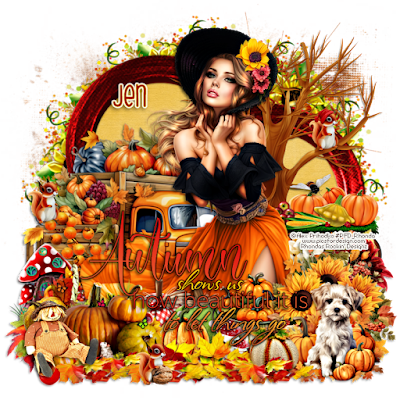
This tutorial is written for those with knowledge of PSPSupplies Needed:Tube of choice: I'm using the wonderful artwork of Alex PrihodkoTube was purchased at PFD HEREPTU Kit by Jens Sweet Temptations called Fall GatheringKit can be purchased at her store HEREWord Art by Wendez Watermark HEREMask of choice
Ok lets get started:Open blank canvas 725x725Open element 40, place to center and resizeUsing MuRa Meister Encircle filter, create a clusterOpen element 28, duplicate and resizePlace frames to top left and near right bottomSee my tag for exampleClick inside frames and expand by 15Add paper of choice behind framesOpen tube of choice and place to center
I used the following:Element 3Element 10Element 12Element 13Element 14Element 15Element 16Element 17Element 19Element 23Element 25Element 27Element 34Element 35Element 41Element 43Element 47Element 52Element 55Element 60Element 65Element 69Element 70Element 78Element 83Element 87Element 91Apply WA to tag
Apply mask of choiceI leave all my layers open for future use
Place your name where you like itAdd the Copyright and your License Number for the tubeResize to your liking and save as PNGThis tutorial was created on September 10,2023 by RhondaAny resemblance to another Tag or Tutorial is purely coincidental
This tutorial is written for those with knowledge of PSPSupplies Needed:Tube of choice: I'm using the wonderful artwork of JennyTube was purchased at EleganceFly HEREPTU Kit by Jens Sweet Temptations called My JulyKit can be purchased at her store HEREWA by Dragonfly Dreams HEREMask of choice
Ok lets get started:Open blank canvas 725x725Open element 57, place to right upperOpen element 10, place to left upperOpen element 12, place to bottom rightOpen tube of choice and place to left sideStart adding elements of your choice
I used the following:Element 5Element 8Element 11Element 18Element 29Element 32Element 56Element 58Element 60Element 61Add WA of choice
Apply mask of choiceI leave all my layers open for future use
Place your name where you like itAdd the Copyright and your License Number for the tubeResize to your liking and save as PNGThis tutorial was created on July 23,2023 by RhondaAny resemblance to another Tag or Tutorial is purely coincidental
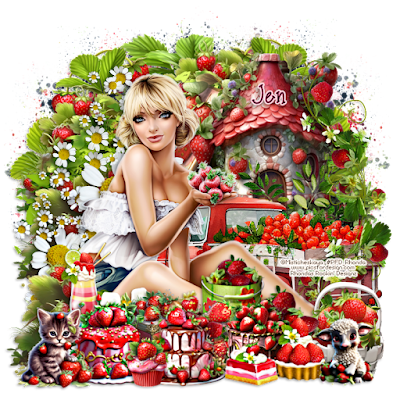
This tutorial is written for those with knowledge of PSPSupplies Needed:Tube of choice: I'm using the wonderful artwork of MisticheskayaTube was purchased at PFD HEREPTU Kit by Jens Sweet Temptations called In The Strawberry PatchKit can be purchased at her store HEREMask of choice
Ok lets get started:Open blank canvas 725x725Open tube of choice and place to left sideOpen element 58, place to upper rightOpen element 68, place to right, move over a littleOpen element 19, place to right beside tubeStart adding elements of your choice
I used the following:Element 2Element 3Element 5Element 10Element 17Element 20Element 21Element 22Element 23Element 26Element 30Element 31Element 32Element 33Element 36Element 37Element 47Element 48Element 49Element 51Element 61Element 64Element 67Element 71Element 80
Apply mask of choiceI leave all my layers open for future use
Place your name where you like itAdd the Copyright and your License Number for the tubeResize to your liking and save as PNGThis tutorial was created on July 21,2023 by RhondaAny resemblance to another Tag or Tutorial is purely coincidental
This tutorial is written for those with knowledge of PSPSupplies Needed:Tube of choice: I'm using the wonderful artwork of Very ManyTube was purchased at store HEREPTU Kit by Jens Sweet Temptations called Summer Starry NightKit can be purchased at her store HEREMask of choice
Ok lets get started:Open blank canvas 725x725Open element 2, place to left hand sideOpen element 53, place to right hand sidePlace tube of choice to bottomStart adding elements of your choice
I used the following:Element 15Element 20Element 22Element 23Element 24Element 26Element 27Element 29Element 33Element 48Element 49Element 52Element 57Element 59Element 60Element 61Element 68Element 71Element 74
Apply mask of choice
Place your name where you like itAdd the Copyright and your License Number for the tubeResize to your liking and save as PNGThis tutorial was created on July 4,2023 by RhondaAny resemblance to another Tag or Tutorial is purely coincidental
This tutorial is written for those with knowledge of PSPSupplies Needed:Tube of choice: I'm using the wonderful artwork of Alex PrihodkeTube was purchased at PFD HEREPTU Kit by Jens Sweet Temptations called Vacay On The WayKit can be purchased at her store HEREMask of choice
Ok lets get started:Open blank canvas 725x725Open element 26 and 13, place to canvasOpen element 14 and place to right sidePlace tube to right sideStart adding elements of your choice
I used the following:Element 3Element 9Element 13Element 15Element 18Element 19Element 20Element 21Element 24Element 28Element 29Element 30Element 31Element 34Element 35Element 38Element 40Element 53Element 56Element 61Element 64Element 65Element 74Element 78
Apply mask of choice
Place your name where you like itAdd the Copyright and your License Number for the tubeResize to your liking and save as PNGThis tutorial was created on July 3,2023 by RhondaAny resemblance to another Tag or Tutorial is purely coincidental
This tutorial is written for those with knowledge of PSPSupplies Needed:Tube of choice: I'm using the wonderful art work of AmberTube was purchased at VMA HEREPTU kit by Jens Sweet Temptations called Sun,Heat and Fun Kit can be purchased at her store HEREWA of choiceMask of choice
Ok lets get started:Open 725x725 canvasPlace tube of choice to tagI placed element 24 and 78 to canvasI used these as a base then started adding elements
Use elements of choice from kit. I used the following:Element 2Element 5Element 7Element 9Element 15Element 17Element 21Element 26Element 43Element 44Element 45Element 53Element 57Element 58Element 70Element 82
Apply mask and WA
Place your name where you like itAdd the Copyright and your License Number for the tubeResize to your liking and save as PNGThis tutorial was created on June 30,2023 by RhondaAny resemblance to another Tag or Tutorial is purely coincidental
This tutorial is written for those with knowledge of PSPSupplies Needed:Tube of choice: I'm using the wonderful artwork of MisticheskayaTube was purchased at her store HEREPTU kit by Jen Sweet Temptations called Rocket PartyI am so happy to announce Jen has opened her own store!!!!!!!!!!!!!Check it out HEREKit HEREWA from Pimpin' PSPers HERESparkles from kit used as mask
Ok lets get started:Open canvas 725x725Place tube to left hand sideOpen element 57, resize and mirrorPlace behind main tubeOpen element 77, resize and place in front of truckThis was my base to start adding elements
Use elements of choice from kit. I used the following:Element 4Element 5Element 6Element 8Element 10Element 27Element 34Element 47Element 50Element 54Element 55Element 58Element 61Element 62Element 64Element 69Element 78Element 82Element 87Element 89Element 94Element 97Element 100
Place your name where you like itAdd the Copyright and your License Number for the tubeResize to your liking and save as PNGThis tutorial was created on June 26,2023 by RhondaAny resemblance to another Tag or Tutorial is purely coincidental.

This tutorial is written for those with knowledge of PSPSupplies Needed:Tube of choice: I'm using the wonderful artwork of Zlata_MTube was purchased at PFD HEREFTU by Jen's Sweet Temptations HEREWA by MizTeeques HEREMask #234 by Tee HEREMask #5 by Allison's Addiction HERE
I made a cluster for this tag below
Ok Let's get Started:Open cluster frame, shift D to duplicate and close originalOpen paper of choice und place under frame (I used 6)Apply mask by TeeOpen tube and position to middle of frame
Use any elements of choice. I used the following:Element 2Element 3Element 6Element 7Element 8Element 10Element 15Element 17Element 24Element 26Element 29Element 30
Open WA, resizeI used a background which I can't share but use your imagination
Merge layers and add mask
Place your name where you like itAdd the Copyright and your License Number for the tubeResize to your liking and save as PNGThis tutorial was created on December 14,2021 by RhondaAny resemblance to another Tag or Tutorial is purely coincidental
This tutorial is written for those with knowledge of PSPSupplies Needed:
Tube of choice: I'm using the wonderful artwork of Alehandra_VanhekTube was purchased at PFD HEREPTU Kit by Jens Sweet Temptations called Christmas In My HeartKit can be purchased at one of her stores HEREKit may not be in store yet so check backMask #310 by Scrappy Bit of Fun HERE
Ok Let's get Started:Open blank canvas 700x700Open elements 71 and place to centerOpen tube and position close to the element
Use any elements of choice. I used the following:Element 2Element 4Element 5Element 9Element 10Element 12Element 14Element 18Element 19Element 20Element 26Element 28Element 31Element 40Element 44Element 57Element 66Element 67
Merge layers and add mask
Place your name where you like itAdd the Copyright and your License Number for the tubeResize to your liking and save as PNGThis tutorial was created on December 10,2021 by RhondaAny resemblance to another Tag or Tutorial is purely coincidental
This tutorial is written for those with knowledge of PSPSupplies Needed:Tube of choice: I'm using the wonderful artwork of LiaThese are FTU tubes I had saved from a groupFTU Kit by Jens Sweet Temptations HEREFTU WA by Venomous Cherries Creations HEREMask of choice
Ok Let's get Started:Open blank canvas 700x700Open elements 7,18,21 & 26 and place to back of tagOpen tube and place where desired
Use any elements of choice. I used the following:Element 1Element 2Element 5Element 6Element 13Element 17Element 27Element 34Element 36Element 43
Merge layers and add mask
Place your name where you like itAdd the Copyright and your License Number for the tubeResize to your liking and save as PNGThis tutorial was created on December 6,2021 by RhondaAny resemblance to another Tag or Tutorial is purely coincidental
This tutorial is written for those with knowledge of PSPThanks to Pammers from Pammers Passions for inspiring this tutorialPammers hosted our Throwback Challenge at TTL with instructions to followUse your creativity to design !!!!!!!!!!!!Supplies Needed:Tube of choice: No tube was used in this tutorialFTU kit by Jens Sweet Temptations HEREWordArt can be downloaded HEREFont HEREMask of choice
Ok Lets get Started:Open blank canvas size 700x700Open element 33 and place to centerOpen element 3 and place to leftOpen element 1 and place to rightOpen element 5 and place to centerWrite out a Holiday word of choice using fontPlace to canvas where desired
Use any elements of choice. I used the following:Element 4Element 8Element 13Element 17Element 40Element 44
Merge layers and add mask
Place your name where you like itAdd the Copyright and your License Number for the tubeResize to your liking and save as PNGThis tutorial was created on November 21,2021 by RhondaAny resemblance to another Tag or Tutorial is purely coincidental
This tutorial is written for those with knowledge of PSPSupplies Needed:Tube of choice: I'm using the wonderful art work of Ellie MilkTube purchased at PFD HEREPTU Kit by Jens Sweet Temptations called Fun On HalloeweenKit can be purchased at one of her stores HEREMask of choice
Ok Lets get Started:Open 700x700 blank canvasPlace tube to center
Use any elements of choice from kit. I used the followingElement 3Element 6Element 12Element 13Element 14Element 33Element 34Element 39Element 40Element 41Element 42Element 43Element 60Element 62Element 67Element 71Element 94Element 96
Merge layers and add mask
Place your name where you like itAdd the Copyright and your License Number for the tubeResize to your liking and save as PNGThis tutorial was created on November 6,2021 by RhondaAny resemblance to another Tag or Tutorial is purely coincidental
This tutorial is written for those with knowledge of PSPSupplies Needed:Tube of choice: I'm using the wonderful art work of SunnyRoseTube was purchased at PFD HEREPTU Kit by Jens Sweet Temptations called Melody of AutumnKit can be purchased at one of her stores HEREMask of choice
Ok Lets get Started:Open blank canvas 700x700Open element 4, resize 120% and place to center Open element 59, resize same and place on topOpen tube and place to tag
Use any elements of choice. I used the following:Element 6Element 9Element 12Element 13Element 15Element 16Element 17Element 18Element 33Element 38Element 39Element 41Element 42Element 43Element 47Element 57Element 60Element 64Element 65
Merge layers and add mask
Place your name where you like itAdd the Copyright and your License Number for the tubeResize to your liking and save as PNGThis tutorial was created on October 18,2021 by RhondaAny resemblance to another Tag or Tutorial is purely coincidental





























