Showing posts with label New Years. Show all posts
Showing posts with label New Years. Show all posts
Saturday, January 1, 2022


Friday, December 31, 2021

Sunday, December 26, 2021

Sunday, December 19, 2021


Ok Let's get Started:
Monday, January 4, 2021

This tutorial is written for those with knowledge of PSP
Supplies Needed:
Tube of choice: I'm using the wonderful art work of Misticheskaya
Tube purchased from PFD HERE
PTU Scrapkit from Purple Dreams Scraps called New Year 2021
Kit purchased from PFD HERE
Mask of choice
Let's get started:
Open 700x700 canvas
Open element 109, resize and rotate 90 to right
Duplicate and resize 85%, rotate to right slightly
Erase parts of frame showing inside
Using freehand tool draw around frame
Open new layer under frame and paste paper of choice
Place tube of choice
Use any elements from kit to complete tag
I used the following:
Element 4
Element 6
Element 11
Element 12
Element 13
Element 14
Element 18
Element 22
Element 32
Element 34
Element 41
Element 47
Element 64
Element 66
Element 71
Element 76
Element 80
Element 86
Element 88
Element 90
Element 96
Merge your layers
Open paper of choice & apply mask
Place your name where you like it
Add the Copyright and your License Number for the tube
Resize to your liking and save as PNG
This tutorial was created on January 4,2021 by Rhonda
Any resemblance to another Tag or Tutorial is purely coincidental
Saturday, January 2, 2021

This tutorial is written for those with knowledge of PSP
Supplies Needed:
Tube of choice: I'm using the wonderful art work of VeryMany
Tube purchased from their store HERE
FTU Scrapkit from Taggers World HERE
Mask of choice
Let's get started:
Open 700x700 canvas
Open element 74 & place to canvas
Open element 11 & place on top
Open element 114, place on top
Place tube of choice
Use any elements from kit to complete tag
I used the following:
Element 4
Element 13
Element 22
Element 41
Element 43
Element 48
Element 63
Element 65
Element 70
Element 98
Element 110
Element 115
Element 120
Merge your layers
Open paper of choice & apply mask
Place your name where you like it
Add the Copyright and your License Number for the tube
Resize to your liking and save as PNG
This tutorial was created on January 2,2021 by Rhonda
Any resemblance to another Tag or Tutorial is purely coincidental

This tutorial is written for those with knowledge of PSP
Supplies Needed:
Tube of choice: I'm using the wonderful art work of VeryMany
Tube purchased from their store HERE
PTU Scrapkit from Crystal Designs called Celebrate
Kit can be purchased at PFD HERE
Mask by Rachel Designs HERE
Let's get started:
Open 700x700 canvas
Open frame 3, resize and place to center
Open frame 4, resize and place on top
Click inside frames and paste paper of choice
Open element 64 and using MuRa Copies Filter make a circle
Place tube of choice
Use any elements from kit to complete tag
I used the following:
Element 1
Element 7
Element 13
Element 26
Element 28
Element 29
Element 38
Element 40
Element 41
Element 43
Element 46
Element 49
Element 84
Element 90
Merge your layers
Open paper of choice & apply mask
I used 2 papers and 2 different masks
Place your name where you like it
Add the Copyright and your License Number for the tube
Resize to your liking and save as PNG
This tutorial was created on January 2,2021 by Rhonda
Any resemblance to another Tag or Tutorial is purely coincidental
Friday, January 1, 2021


This tutorial is written for those with knowledge of PSP
Supplies Needed:
Tube of choice: I'm using the wonderful art work of VeryMany
Tube purchased from their store HERE
PTU Scrapkit from Wicked Princess called New Years Gala
Kit can be purchased at her store HERE
Mask by Grims Creations HERE
Let's get started:
Open 700x700 canvas
Open frame 3, resize and place to center
Duplicate and rotate to right slightly
Click inside frames and paste papers of choice
Merge frames
Place tube of choice
Use any elements from kit to complete tag
I used the following:
Book 2
Bottle 3&4
Butterfly 1&2
Candle
Card
Cluster
Deco 3
Flower 10
Gift
Glass 1&2
Glitter
Ornament
Word Art
Merge your layers
Open paper of choice & apply mask
Place your name where you like it
Add the Copyright and your License Number for the tube
Resize to your liking and save as PNG
This tutorial was created on January 1,2021 by Rhonda
Any resemblance to another Tag or Tutorial is purely coincidental
Saturday, December 26, 2020

This tutorial is written for those with knowledge of PSP
Supplies Needed:
Tube of choice: I'm using the wonderful art work of Dixie Black (Swan Scraps)
Tube was included in kit but credit to Swan Scraps
PTU Scrapkit by Moonshine Dezinez called New Year Celebrations
Kit can be purchased PFD HERE
I can't link directly to kit so look under Scrap Kit Designers to find her kits
Word Art by Sandy at Creative Misfits HERE
Mask by Leather and Lace Ads HERE
Let's get started:
Open 700x700 canvas
Open element 14, resize and center
Using MuraMeister filter make frame
Place tube to center
Use any elements from kit to complete tag
I used the following:
Element 1
Element 10
Element 15
Element 20
Element 21
Element 39
Element 44
Element 46
Element 62
Element 63
Element 64
Element 65
Element 75
Merge your layers
Open paper of choice & apply mask
Place your name where you like it
Add the Copyright and your License Number for the tube
Resize to your liking and save as PNG
This tutorial was created on December 26,2020 by Rhonda
Any resemblance to another Tag or Tutorial is purely coincidental
Friday, January 10, 2020

This tutorial is written for those with knowledge of PSP
Supplies Needed:
Tube of choice: I'm using the wonderful art work of Keith Garvey
Which you must obtain a license to use at CDO HERE
PTU Scrapkit by Jens Sweet Temptations called "Champagne Dreams"
You can purchase this awesome kit from one of her stores HERE
Mask of choice
Ok Lets get Started:
This is a very quick and easy tutorial
Use my tag as a guide
Open paper 3 and place in your PSP program
In the Materials section place background to pattern with paper
Draw out a large circle and convert to raster
Selections, modify and expand by 5
Add new layer under circle and flood fill with gold gradient or color
Add noise with settings of choice x2
Merge these 2 layers together and move to middle left side of canvas
Open paper 5 and place in your PSP program
In the Materials section place background to pattern with paper
Draw out a rectangle and convert to raster
Selections, modify and expand by 5
Add new layer under circle and flood fill with pinkish color
Add noise with settings of choice x2
Merge these 2 layers together and move to middle right side of canvas
Place your tube to center more to right
Now time to add our elements - Use my tag as an example
I used the following:
Element 13
Element 17
Element 18
Element 26
Element 27
Element 34
Element 35
Element 36
Element 37
Element 38
Element 40
Element 52
Element 61
Element 62
Element 74
Element 84
Element 85
Element 96
Element 97
Merge your layers
Open paper of choice and apply mask
Place your name where you like it
Add the Copyright and your License Number for the tube
Resize to your liking and save as PNG
This tutorial was created on January 10,2020 by Rhonda
Any resemblance to another Tag or Tutorial is purely coincidental

This tutorial is written for those with knowledge of PSP
Supplies Needed:
Tube of choice: I'm using the wonderful art work of Alehandra_Vanhek
This is an exclusive tube at PFD
Which you must obtain a license to use HERE
PTU Scrapkit by Jens Sweet Temptations called "Champagne Dreams"
You can purchase this awesome kit from one of her stores HERE
Mask of choice
Ok Lets get Started:
This is a very quick and easy tutorial
Open element 40 & place to right of canvas (I resized mine around 107%)
Using magic wand click inside frame, selections modify by 10
Open new layer and place under frame
Open paper 4 and paste into selection. Select none
Merge layers together.
Place your tube to center
Now time to add our elements - Use my tag as an example
I used the following:
Element 11
Element 14
Element 27
Element 28
Element 30
Element 35
Element 37
Element 45
Element 54
Element 56
Element 63
Element 79
Element 81
Element 96
Element 99
Merge your layers
Open paper of choice and apply mask
Place your name where you like it
Add the Copyright and your License Number for the tube
Resize to your liking and save as PNG
This tutorial was created on January 10,2020 by Rhonda
Any resemblance to another Tag or Tutorial is purely coincidental
Saturday, January 24, 2015
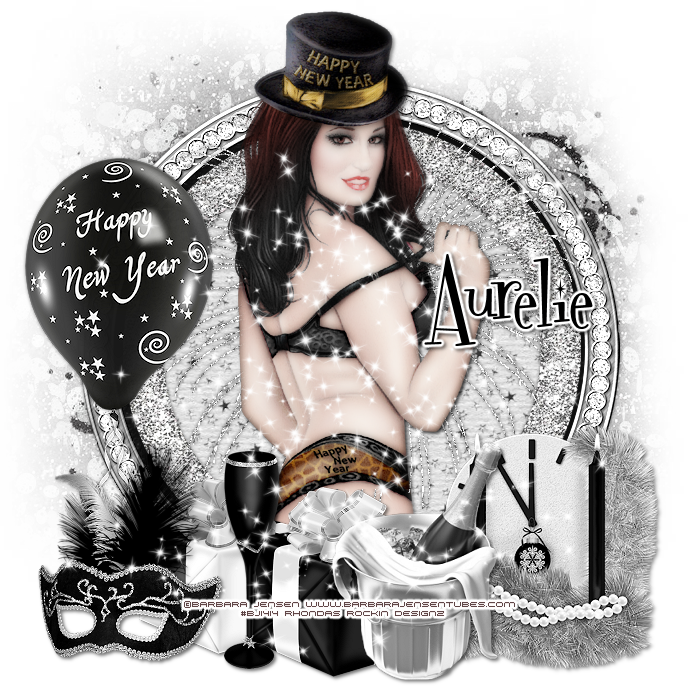
This tutorial is written for those with knowledge of PSP
Supplies Needed:
Tube of choice: I'm using the wonderful art work of Barbara Jensen
You can purchase her tubes HERE
PTU Scrap Kit by Purple Dream Scraps called New Year 2015
You can purchase this awesome kit HERE
Mask of choice
Ok Lets get Started:
Open a blank image 700x700
Open frame 2 and place as a new layer
Open frame 1 and place as new layer
Grab the magik wand and click inside frame
Open paper 13 and place as a new layer
Move paper under frames
Place your main tube
Xero Radiance with settings of choice
Now add any elements of choice
I used the following:
Balloon
Champagne 2
Clock
Fireworks 2
Glass
Mask
Present
Present 2
Sparkles
Merge your layers
Open paper of choice and apply mask
Place your name where you like it
Add the Copyright and your License Number for the tube
Resize to your liking and save as PNG
This tutorial was created on January 24,2015 by Rhonda
Any resemblance to another Tag or Tutorial is purely coincidental

Monday, January 19, 2015

This tutorial is written for those with knowledge of PSP
Supplies Needed:
Tube of choice: I'm using the wonderful art work of Z_lataM
You can purchase this work at PFD
FTU Scrap Kit by Jen from Sweet Temptations HERE
Template by Simply4U HERE
Don't forget to leave a thank you when downloading
Ok Lets get Started:
Open template - Shift D to duplicate then close out original
Resize template 94% all layers
Canvas Size 700x700
Delete copyright,small rectangles and winter scene
Click on circle background selections,select all, float,defloat
paste a paper of choice from the kit - I used glitter2
selection invert delete
select none delete the original
Click on circle selections,select all, float,defloat
paste a paper of choice from the kit - I used paper1
selection invert delete
select none delete the original
Click on large rectangle background selections,select all, float,defloat
paste a paper of choice from the kit - I used glitter3
selection invert delete
select none delete the original
Click on large rectangle selections,select all, float,defloat
paste a paper of choice from the kit - I used paper5
selection invert delete
select none delete the original
Click on oval selections,select all, float,defloat
paste a paper of choice from the kit - I used paper6
selection invert delete
select none delete the original
Place your main tube
Xero Radiance with settings of choice
Now time to add our elements
I used the following:
Centerpiece
Champagne Bucket
Cupcake
Decorations
Fireworks
Glass
Merge your layers
Open paper of choice & apply mask
Place your name where you like it
Add the Copyright and your License Number for the tube
Resize to your liking and save as PNG
This tutorial was created on January 19,2015 by Rhonda
Any resemblance to another Tag or Tutorial is purely coincidental
 HERE
HERE
Wednesday, December 31, 2014

This tutorial is written for those with knowledge of PSP
Supplies Needed:
Tube of choice: I'm using the wonderful art work of The Hunter
You must obtain a license to use this art at S&Co HERE
PTU Scrap Kit from Kizzed by Kelz called "New year Blues"
You an purchase this awesome kit at S&Co HERE
Template from Dangerously Delicious Designz HERE
Mask of choice
Open template - Shift D to duplicate then close out original
Canvas size 700x700
delete copyright
paste a paper of choice from the kit - I used paper15
selection invert delete
select none delete the original
paste a paper of choice from the kit - I used paper9
selection invert delete
select none delete the original
paste a paper of choice from the kit - I used paper4
selection invert delete
select none delete the original
paste a paper of choice from the kit - I used paper18
selection invert delete
select none delete the original
paste a paper of choice from the kit - I used paper27
selection invert delete
select none delete the original
paste a paper of choice from the kit - I used paper24
selection invert delete
select none delete the original
paste a paper of choice from the kit - I used paper5
selection invert delete
select none delete the original
I used the following:
Element 3
Element 4
Element 5
Element 26
Element 27
Element 39
Element 48
Element 68
Element 79
Element 90
Element 94
Element 97
Element 126
Element 127
Open paper of choice & apply mask
Add the Copyright and your License Number for the tube
Resize to your liking and save as PNG
This tutorial was created on December 31,2014 by Rhonda
Any resemblance to another Tag or Tutorial is purely coincidental

This tutorial is written for those with knowledge of PSP
Supplies Needed:
Tube of choice: I'm using the wonderful art work of The Hunter
You must obtain a license to use his art at S&Co HERE
Matching PTU Scrapkit by Bibi Collection HERE
Mask of choice
This is a very quick and easy tutorial
Open element 64 & place in center
Grab the magic wand & click inside frame
Selections modify expand by 15
Add new layer under frame
Open paper 5 & paste into selections
Open element 71 and place on top of first frame
I used:
Element 4
Element 5
Element 6
Element 12
Element 13
Element 22
Element 32
Element 38
Element 59
Element 78
Element 127
Element 165
Element 168
Element 170
Element 172
Open paper 4 & apply mask of choice
Add the Copyright and your License Number for the tube
Resize to your liking and save as PNG
This tutorial was created on December 31,2014 by Rhonda
Any resemblance to another Tag or Tutorial is purely coincidental

This tutorial is written for those with knowledge of PSP
Supplies Needed:
Tube of choice: I'm using the wonderful art work of VeryMany
Which you must obtain a license to use HERE
PTU Scrap Kit by Jens Sweet Temptations called One Year
You an purchase this awesome kit HERE
Template by StyleLicious HERE
Mask by Dangerously Delicious HERE
Open template - Shift D to duplicate then close out original
Canvas size 700x700
delete copyright & wordart
paste a paper of choice from the kit - I used paper8
selection invert delete
select none delete the original
paste a paper of choice from the kit - I used paper7
selection invert delete
select none delete the original
paste a paper of choice from the kit - I used paper9
selection invert delete
select none delete the original
paste a paper of choice from the kit - I used paper2
selection invert delete
select none delete the original
paste a paper of choice from the kit - I used paper3
selection invert delete
select none delete the original
Xero Radiance with settings of choice
I used the following:
Bling 1
Bracket
Champagne Flute
Champagne
Fireworks 3
Flute
Hat 2
Lets Celebrate
Music
Party Cluster
Ticket
Wands
Open glitter paper of choice and apply any mask
Add the Copyright and your License Number for the tube
Resize to your liking and save as PNG
This tutorial was created on December 31,2014 by Rhonda
Any resemblance to another Tag or Tutorial is purely coincidental
Tuesday, December 30, 2014

This tutorial is written for those with knowledge of PSP
Supplies Needed:
Tube of choice: I'm using the wonderful art work of Andy Cooper
You must obtain a license to use his art at S&Co HERE
FTU Scrapkit by Digicats HERE
Mask #8 by Chrissy Chaos HERE
This is a very quick and easy tutorial
Open blank canvas 700x700
Open frame 9 and place in center
Open frame 7 and place on top
Grab the magic wand & click inside top frame
Selections modify expand by 10
Open paper 17 & paste as new layer
Selections invert delete
Move paper under frame
I used the following:
Balloon 2
Champagne 1
Curly Bow
Fireworks 3
Flower 2
Metalic Flute
New Years Clock 1&3
Party Hat 1
Swizzle Stick
Tree 2
Open paper 19 & apply mask
Add the Copyright and your License Number for the tube
Resize to your liking and save as PNG
This tutorial was created on December 30,2014 by Rhonda
Any resemblance to another Tag or Tutorial is purely coincidental
Monday, December 29, 2014

This tutorial is written for those with knowledge of PSP
Supplies Needed:
Tube of choice: Im using the wonderful art work of Keith Garvey
You can purchase his tubes HERE
FTU scrapkit by Distrubed Scraps HERE
Please leave some love when you download
Open a blank 700x700 image
Open frame 064 and place in center
Using selection tool draw around frame
Add new layer under frame and paste into selection
Apply Xero Radiance
I used the following:
Element 10
Element 12
Element 20
Element 37
Element 45
Element 46
Element 52
Element 53
Element 66
Add the Copyright and your License Number for the tube
Resize to your liking and save as PNG
This tutorial was created on December 26,2014 by Rhonda
Any resemblance to another Tag or Tutorial is purely coincidental
Subscribe to:
Posts
(Atom)
Grab My Blinkie

I CT For



Blogs I Visit
























