Showing posts with label Designer Scraps. Show all posts
Showing posts with label Designer Scraps. Show all posts
Wednesday, October 16, 2013

Supplies Needed:
Tube of choice: Im using the wonderful art work of Very Many
Which you must obtain a license to use at PFD HERE
PTU Scrap Kit by WD Designs called "Magical Darkness"
You an purchase this awesome kit at Designer Scraps HERE
Texture of choice HERE
Mask #156 by Vaybs HERE
Please leave a thank you when downloading freebies
Open blank 700x700 image
Open frame 6 & paste as new layer
Grab the magic wand and click inside frame
Selections modify expand by 6
Open paper 14 & paste as new layer
Selections invert delete
Move paper under frame
Open texture of choice and place as new layer
Selections modify expand by 6
Selections invert delete
Change blend mode to Luminance
I used the floowing:
Element 10
Element 25
Element 35
Element 38
Element 39
Element 40
Element 42
Element 50
Element 56
Element 57
Element 64
Element 65
Element 72
Element 75
Element 84
Open paper 17 & apply mask
Add the Copyright and your License Number for the tube
Resize to your liking and save as PNG
This tutorial was created on October 16,2013 by Rhonda
Any resemblance to another Tag or Tutorial is purely coincidental

Thursday, October 10, 2013
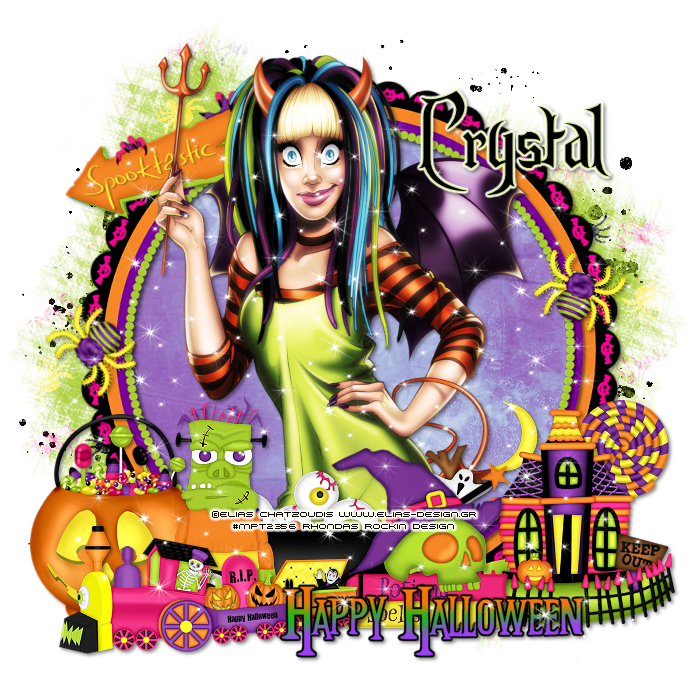
Supplies Needed:
Tube of choice: Im using the wonderful art work of Elias Chatzoudis
This tube was purchased at MPT which has closed
You can purchase his tubes now at his store HERE
PTU Scrap Kit by Crystals Creations called "Spooktastic"
You an purchase this awesome kit at Designer Scraps HERE
Texture #1 by devilMisao HERE
Mask #167 by Weescotslass Creations HERE
Links are on right side of blog
Xero Radiance
Ok Lets get Started:
Open blank canvas 700x700
Open element 34 & place in center
Grab the magic wand & click inside the frame
Selections modify expand by 8
Open paper 10 and place as new layer
Selections invert delete
Move paper under frame
Open element and place as new layer
Selections invert delete
Change blend mode to screen
Apply Xero Radiance with settings of choice
I used:
Element 1
Element 2
Element 3
Element 4
Element 10
Element 18
Element 19
Element 20
Element 23
Element 33
Element 35
Element 39
Open paper 5 and apply mask
Add the Copyright and your License Number for the tube
Resize to your liking and save as PNG
This tutorial was created on October 10,2013 by Rhonda
Any resemblance to another Tag or Tutorial is purely coincidental
Saturday, September 28, 2013

Supplies Needed:
Tube of choice: Im using the wonderful art work of VeryMany
Which you must obtain a license to use at PFD HERE
PTU Scrap Kit by Farrah's Design Scraps called "Autumn Glory"
You an purchase this awesome kit at Designer Scraps HERE
Open blank 700x700 image
Open frame 1 & paste as new layer
Grab the magic wand and click inside frame
Selections modify expand by 8
Open paper 9 & paste as new layer
Selections invert delete
Move paper under frame
I used the following:
Basket of Fruit
Bow 1
Butterfly 1&2
Flower 1,2,5,6&7
Ivy
Leaves 1,3&4
Mesh
Pinecone 1&2
String 1
Add the Copyright and your License Number for the tube
Resize to your liking and save as PNG
This tutorial was created on September 29,2013 by Rhonda
Any resemblance to another Tag or Tutorial is purely coincidental
Thursday, September 19, 2013

Supplies Needed:
Tube of choice: I'm using the wonderful art work of Pinup Toons
This tube was purchased at CIM which has now closed
You must obtain a license to use this art at CDO HERE
PTU Scrap Kit by Honored Scraps called "Falling Into Autumn"
You an purchase this awesome kit at Designer Scraps Store HERE
Mask #8 by Chrissy Chaos HERE
Open blank canvas 700x700
Open frame 3 & place in center
Grab the magic wand & click inside the frame
Selections modify expand by 5
Open paper 11 & place as new layer
Selections invert delete
Move paper under frame
Open autumn element, resize and place in front of frame
I used:
Acorns
Corn
Flower 5,6&7
Leaves 4
Nuts
PineCone 1&2
Wheat
Open paper 1 and apply mask
Add the Copyright and your License Number for the tube
Resize to your liking and save as PNG
This tutorial was created on September 20,2013 by Rhonda
Any resemblance to another Tag or Tutorial is purely coincidental
Tuesday, August 27, 2013

Supplies Needed:
Tube of choice: Im using the wonderful art work of Jennifer Janesko
This tube was purchased at CILM which has cloed
You must obtain a license to use her art now at CDO HERE
PTU Scrap Kit by Devilish Dezines Scraps called "Memories"
You an purchase this awesome kit at Designer Scraps HERE
Mask #23 by Gems Taggin Scraps HERE
Don't forget to leave a thank you when downloading
Open blank canvas 700x700
Open frame 1 & place in center - resize to liking
Grab the magic wand & click inside the frame
Selections modify expand by 5
Open paper 3 and paste as new layer
Selections Invert Delete
Move paper under frame
I used:
Element 1
Element 2
Element 13
Element 23
Element 37
Element 38
Element 44
Element 46
Element 49
Element 50
Open paper 2 and apply mask
Apply Filters Unlimited Texture
Add new layer and flood fill with color of choice
Apply another mask of choice
Add the Copyright and your License Number for the tube
Resize to your liking and save as PNG
This tutorial was created on August 27,2013 by Rhonda
Any resemblance to another Tag or Tutorial is purely coincidental
Tuesday, August 13, 2013

Supplies Needed:
Tube of choice: Im using the wonderful art work of Misticheskaya
Which you must obtain a license to use at SATC HERE
PTU Scrap Kit by Farrah's Design Scraps called "Orange Cream"
You an purchase this awesome kit at Designer Scraps HERE
Mask #78 by Rosesblack HERE
Xero Radiance
Open blank 700x700 image
Open frame & paste as new layer
Grab the magic wand and click inside frame
Selections modify expand by 8
Open paper 6 & paste as new layer
Selections invert delete
Move paper under frame
Apply Xero Radiance with settings of choice
Now time to add our elements
I used the following:
Butterfly
Flower 2
Flower 5
Flower 10,11&12
Orange
Ribbon 2
Scatter 2
Vine 2
Open paper 3 & apply mask
Add the Copyright and your License Number for the tube
Resize to your liking and save as PNG
This tutorial was created on August 13,2013 by Rhonda
Any resemblance to another Tag or Tutorial is purely coincidental
Sunday, August 4, 2013

Supplies Needed:
Tube of choice: Im using the wonderful art work of Diana Gila
You must obtain a license to use her art at SATC HERE
PTU Scrap Kit by Tasha's Playground called "Urban Glam"
You an purchase this awesome kit at Designer Scraps HERE
Template #226 by Missy HERE
Download links are on the left hand side of blog
Mask #12 by Millie HERE
Don't forget to leave a thank you when downloading
Xero Porcelin
Open template - Shift D to duplicate then close out original
Resize all layers 124%
Canvas 700x700
Delete copyright
paste a paper of choice from the kit - I used paper2
selection invert delete
select none delete the original
paste a paper of choice from the kit - I used paper3
selection invert delete
select none delete the original
paste a paper of choice from the kit - I used paper5
selection invert delete
select none delete the original
paste a paper of choice from the kit - I used paper1
selection invert delete
select none delete the original
Add Xero Porcelin with settings of choice
I used the following:
Broken Glass
Can
Cityscape
Musicplayer
Pouch
Purse
Record
Skulls
Sneakers
Speakers
Warning Label
Web
Open paper 11 & apply mask
Add the Copyright and your License Number for the tube
Resize to your liking and save as PNG
This tutorial was created on August 4,2013 by Rhonda
Any resemblance to another Tag or Tutorial is purely coincidental
Sunday, July 21, 2013

Supplies Needed:
Tube of choice: Im using the wonderful art work of Barbara Jensen
You must obtain a license to use her art HERE
PTU Scrap Kit by Wicked Princess called "A Little Bit Vintage"
You an purchase this awesome kit at Designer Scraps HERE
Mask #19 by Vix HERE
Open blank canvas 700x700
apply Xero Radiance with settings of choice
I used:
Books 1&2
Bottle
Butterfly 2
Card 5
Cards
Clock
Fan 2
FlowerBunch
Phone 2
Pillow
Open paper 8 and apply mask
I duplicated mine and moved them around
Add the Copyright and your License Number for the tube
Resize to your liking and save as PNG
This tutorial was created on July 21,2013 by Rhonda
Any resemblance to another Tag or Tutorial is purely coincidental
Sunday, July 7, 2013

Supplies Needed:
Tube of choice: Im using the wonderful art work of Zindy S.D. Nielsen
You must obtain a license to use her art at her store HERE
PTU Scrap Kit by Devilish Dezines Scraps called "Cherish"
You an purchase this awesome kit at Designer Scraps HERE
Template #39 by Tik Tok Creations HERE
Don't forget to leave a thank you when downloading
Xero Porcelin
Open template - Shift D to duplicate then close out original
Resize all layers 90%
Canvas 700x700
Delete copyright
paste a paper of choice from the kit - I used paper6
selection invert delete
select none delete the original
paste a paper of choice from the kit - I used paper2
selection invert delete
select none delete the original
paste a paper of choice from the kit - I used paper3
selection invert delete
select none delete the original
paste a paper of choice from the kit - I used paper6
selection invert delete
select none delete the original
paste a paper of choice from the kit - I used paper1
selection invert delete
select none delete the original
paste a paper of choice from the kit - I used paper5
selection invert delete
select none delete the original
paste a paper of choice from the kit - I used paper4
selection invert delete
select none delete the original
Add Xero Porcelin with settings of choice
I used the following:
Element 5
Element 13
Element 17
Element 19
Element 29
Element 34
Element 36
Element 40
Element 42
Element 46
Element 47
Add the Copyright and your License Number for the tube
Resize to your liking and save as PNG
This tutorial was created on July 7,2013 by Rhonda
Any resemblance to another Tag or Tutorial is purely coincidental
Monday, June 24, 2013

Supplies Needed:
Tube of choice: Im using the wonderful art work of Zindy S.D. Nielsen
You must obtain a license to use her art at her store HERE
PTU Scrap Kit by Devilish Dezines Scraps called "Trishas Realm"
You an purchase this awesome kit at Designer Scraps HERE
Mask of choice
Open blank canvas 700x700
Open frame 1 & place in center - resize to liking
Rotate frame 90 to right
Grab the magic wand & click inside the frame
Selections modify expand by 5
Open paper 3 and paste as new layer
Selections Invert Delete
Move paper under frame
Place your main tube where you desire
Now add any other elements you want to your tag
I used:
Element 6
Element 15
Element 19
Element 26
Element 27
Element 32
Element 33
Element 42
Element 50
Open paper 1 and apply mask
Add the Copyright and your License Number for the tube
Resize to your liking and save as PNG
This tutorial was created on June 24,2013 by Rhonda
Any resemblance to another Tag or Tutorial is purely coincidental
Thursday, June 20, 2013

Supplies Needed:
Tube of choice: Im using the wonderful art work of Elias Chatzoudis
You must obtain a license to use this art at his store HERE
PTU Scrap Kit by Krissys Scraps called "Back Off Bitches"
You an purchase this awesome kit at Designer Scraps HERE
Mask of choice
Open blank canvas 700x700
Open frame 1 & place in center - resize to liking
Grab the magic wand & click inside the frame
Selections modify expand by 5
Open paper 10 and paste as new layer
Selections Invert Delete
Move paper under frame
Place your main tube in center of tag
Now add any other elements you want to your tag
I used:
Label 1
Wire Heart 3
Button 4
Brad 1
Flaming Skull 1
Bird Hand 2
Cupcake 1
Bloom 1,2,3&4
Open paper 5 and apply mask
Add the Copyright and your License Number for the tube
Resize to your liking and save as PNG
This tutorial was created on June 20,2013 by Rhonda
Any resemblance to another Tag or Tutorial is purely coincidental
Friday, May 17, 2013

Supplies Needed:
Tube of choice: Im using the wonderful art work of Zindy S.D.Nielsen
Which you must obtain a license to use at her store HERE
PTU Scrap Kit by Farrah's Design Scraps called "Peaceful Day"
You an purchase this awesome kit at Designer Scraps HERE
Mask of choice
Xero Radiance
Open blank 700x700 image
Open frame 3 resize 26% paste as new layer
Grab the magic wand and click inside frame
Selections modify expand by 5
Open paper 6 & paste as new layer
Selections invert delete
Move paper under frame
Open heart 2 resize 20% place in front of frame
Open flower 3 resize resize 20% place to right of frame
Open flower 4 resize 16% place to right of frame
Open pillow resize 30% place to bottom right of frame
Open pincone 2 resize 15% place under frame to the right
Place your main tube to right of tag
Apply Xero Radiance with settings of choice
Open kite resize 20% and rotate place to left of frame
Open flower 2 resize 13% place to bottom right of tag
Open flower resize 24% place to bottom left of tag
Merge your layers
Open paper 4 & apply mask
Add the Copyright and your License Number for the tube
Resize to your liking and save as PNG
This tutorial was created on May 17,2013 by Rhonda
Any resemblance to another Tag or Tutorial is purely coincidental
Monday, May 6, 2013

Supplies Needed:
Tube of choice: I'm using the wonderful art work of Zindy S.D.Nielsen
You must obtain a license to use her art at her store HERE
PTU Scrap Kit by Honored Scraps called "Time Passes by"
You an purchase this awesome kit at Designer Scraps Store HERE
Mask of choice
Xero Porcelin
Penta Color Dot
Open blank canvas 700x700
Open element 31 & place in center
Open element 37 & place in center
Grab the magic wand & click inside the frame
Selections modify expand by 5
Open paper 8 & place as new layer
Selections invert delete
Move paper under frame
Open element 41 and place on top of other frame
Place your main tube in center of tag
Apply Xero Porcelin with settings of choice
I used:
Element 2
Element 12
Element 16
Element 19
Element 20
Element 21
Element 25
Element 44
Element 46
Element 52
Open paper 2 and apply mask
Apply Penta Color Dot to mask layer
Add the Copyright and your License Number for the tube
Resize to your liking and save as PNG
This tutorial was created on May 6,2013 by Rhonda
Any resemblance to another Tag or Tutorial is purely coincidental
Monday, April 29, 2013

Supplies Needed:
Tube of choice: Im using the wonderful art work of Ismael Rac
You must obtain a license to use his art HERE
PTU Scrap Kit by Crystals Creations called "Punk It"
You an purchase this awesome kit at Designer Scraps HERE
Mask #157 by Vaybs HERE
Don't forget to leave some love when you download
Xero Radiance
Open blank canvas 700x700
Open element 12 & place in center
Grab the magic wand & click inside the frame
Selections modify expand by 5
Open paper 6 & paste as new layer
Selections invert delete
Move paper under frame
Open element 25 and paste as new layer in frame
Duplicate as many times to fill the frame
Apply Xero Radiance with settings of choice
I used:
Element 8
Element 9
Element 17
Element 20
Element 31
Element 33
Open paper 12 and apply mask
Add the Copyright and your License Number for the tube
Resize to your liking and save as PNG
This tutorial was created on April 29,2013 by Rhonda
Any resemblance to another Tag or Tutorial is purely coincidental
Monday, April 15, 2013


This tutorial is written for those with knowledge of PSP
Supplies Needed:
Tube of choice: Im using the wonderful art work of Barbara Jensen
You must obtain a license to use her art at ther store HERE
PTU Scrap Kit by Wicked Princess called "Deadly Desires"
You an purchase this awesome kit at Designer Scraps HERE
Mask #64 from Rosesblack HERE
Please leave a thank you when downloading freebies
Xero Radiance
Open blank 700x700 image
Open frame 15 from kit and place as new layer
Grab the magic wand and click inside frame
Selections modify expand by 10
Open paper 8 & paste as new layer
Selections invert delete
Move paper under frame
Apply Xero Radiance with settings of choice
I used the following:
Book
Book 2
Bottle 2&3
Butterfly
Corsage
Cross 6
Flower 2,4&6
Music Sheet
Open paper 3 & apply mask
Add the Copyright and your License Number for the tube
Resize to your liking and save as PNG
This tutorial was created on April 15,2013 by Rhonda
Any resemblance to another Tag or Tutorial is purely coincidental

Supplies Needed:
Tube of choice: Im using the wonderful art work of Myriadelle
Which you must obtain a license to use at CDO HERE
PTU Scrap Kit by Farrah called "Autumn Blues"
You an purchase this awesome kit HERE
Don't forget to leave a thank you when downloading
Plugins Used:
Xero Radiance
Open template - Shift D to duplicate then close out original
delete copyright
paste a paper of choice from the kit - I used paper10
selection invert delete
select none delete the original
paste a paper of choice from the kit - I used paper5
selection invert delete
select none delete the original
paste a paper of choice from the kit - I used paper6
selection invert delete
select none delete the original
paste a paper of choice from the kit - I used paper5
selection invert delete
select none delete the original
paste a paper of choice from the kit - I used paper7
selection invert delete
select none delete the original
paste a paper of choice
Change blend mode to overlay
selection invert delete
select none delete the original
paste a paper of choice from the kit - I used paper1
selection invert delete
select none delete the original
apply Xero Radiance with settings of choice
Add new layer and flood fill with a yellow color
add noise of choice
selection invert delete
select none delete the original
paste a paper of choice from the kit - I used paper18
add noise with settings of choice
selection invert delete
select none delete the original
Xero Radiance with settings of choice
I used the following:
Apple
Basket
Bear
Jar
Leaves
Light
Wagon Wheel
Add the Copyright and your License Number for the tube
Resize to your liking and save as PNG
This tutorial was created on September 18,2012 by Rhonda
Any resemblance to another Tag or Tutorial is purely coincidental
Friday, April 12, 2013

Supplies Needed:
Tube of choice: Im using the wonderful art work of VeryMany
You must obtain a license to use this art at PFD HERE
PTU Scrap Kit by Lexi Creationz Scrapz called "Punk'd"
You an purchase this awesome kit at Designer Scraps HERE
Template #130 by Rachel from Scraps of Enchantment HERE
Don't forget to leave a thank you when downloading
Xero Radiance
Open template - Shift D to duplicate then close out original
Canvas 700x700
Delete copyright & stars
paste a paper of choice from the kit - I used paper3
selection invert delete
select none delete the original
paste a paper of choice from the kit - I used paper1
selection invert delete
select none delete the original
paste a paper of choice from the kit - I used paper8
selection invert delete
select none delete the original
add noise
paste a paper of choice from the kit - I used paper6
selection invert delete
select none delete the original
On the frames I added a gradient with noise
Add Xero Radiance with settings of choice
I used the following:
Element 1
Element 2
Element 3
Element 4
Element 10
Element 12
Element 13
Element 18
Element 23
Element 24
Element 37
Element 42
Add the Copyright and your License Number for the tube
Resize to your liking and save as PNG
This tutorial was created on March 20,2013 by Rhonda
Any resemblance to another Tag or Tutorial is purely coincidental

Supplies Needed:
Tube of choice: Im using the wonderful art work of Lady Mishka
I bought this tube about a year ago when she was selling at SATC
She left but has returned with more awesome tubes
You must obtain a license to use this art at SATC HERE
PTU Scrap Kit by Wicked Princess called "Cupcake Rainbow"
You an purchase this awesome kit at Designer Scraps HERE
Template by TallChic D-Zines HERE
Don't forget to leave a thank you when downloading
Xero Radiance
Open template - Shift D to duplicate then close out original
Canvas 700x700
Delete copyright,wordart & back
paste a paper of choice from the kit - I used paper10
selection invert delete
select none delete the original
add noise
paste a paper of choice from the kit - I used paper7
selection invert delete
select none delete the original
paste a paper of choice from the kit - I used paper5
selection invert delete
select none delete the original
paste a paper of choice from the kit - I used paper14
selection invert delete
select none delete the original
paste a paper of choice from the kit - I used paper19
selection invert delete
select none delete the original
paste a paper of choice from the kit - I used paper6
selection invert delete
select none delete the original
add close-up of tubes you are using
selection invert delete
select none delete the original
apply Xero Radiance
paste a paper of choice from the kit - I used paper9
selection invert delete
select none delete the original
add noise
applyd Xero Radiance again
I used the following:
Butterfly 1&2
Cakepop
Candy 1&2
Cupcake 2,3,4&10
Flower 1
Gumdrop
Heart Frame
Mum
Rose 1&2
Sucker 3
Merge your layers
Add the Copyright and your License Number for the tube
Resize to your liking and save as PNG
This tutorial was created on March 31,2013 by Rhonda
Any resemblance to another Tag or Tutorial is purely coincidental

This tutorial is written for those with knowledge of PSP
Supplies Needed:
Tube of choice: Im using the wonderful art work of Barbara Jensen
You must obtain a license to use this art at her store HERE
PTU Scrap Kit by Crystals Creations called "Bad Girls"
You an purchase this awesome kit at Designer Scraps HERE
Mask of choice
Supplies Needed:
Tube of choice: Im using the wonderful art work of Barbara Jensen
You must obtain a license to use this art at her store HERE
PTU Scrap Kit by Crystals Creations called "Bad Girls"
You an purchase this awesome kit at Designer Scraps HERE
Mask of choice
Plugins Used:
Xero Radiance
Alien Skin Xenofex2 Constellation
Xero Radiance
Alien Skin Xenofex2 Constellation
Ok Lets get Started:
Open blank canvas 700x700
Open element 14 & place in center
Grab the magic wand & click inside the frame
Selections modify expand by 5
Drop down a layer and add new layer
Flood fill with an off black color
Apply Xenofex Constellation with settings of choice
Open element 1 and place inside frame..I duplicated mine
Open blank canvas 700x700
Open element 14 & place in center
Grab the magic wand & click inside the frame
Selections modify expand by 5
Drop down a layer and add new layer
Flood fill with an off black color
Apply Xenofex Constellation with settings of choice
Open element 1 and place inside frame..I duplicated mine
Place your main tube in center of tag
Apply Xero Radiance with settings of choice
Now add any other elements you want to your tag
I used:
Element 4
Element 5
Element 6
Element 17
Element 18
Element 19
Element 20
Element 21
Element 25
Element 30
Element 32
Element 38
Merge your layers
Open paper 7 and apply mask
Open paper 7 and apply mask
Place your name where you like it
Add the Copyright and your License Number for the tube
Resize to your liking and save as PNG
This tutorial was created on April 8,2013 by Rhonda
Any resemblance to another Tag or Tutorial is purely coincidental
Add the Copyright and your License Number for the tube
Resize to your liking and save as PNG
This tutorial was created on April 8,2013 by Rhonda
Any resemblance to another Tag or Tutorial is purely coincidental
Subscribe to:
Posts
(Atom)
Grab My Blinkie

I CT For



Blogs I Visit
























