Showing posts with label Steampunk. Show all posts
Showing posts with label Steampunk. Show all posts
Thursday, August 7, 2025


Wednesday, July 24, 2024


Tuesday, June 14, 2022


Thursday, April 7, 2022

Sunday, August 8, 2021

Supplies Needed:
Tube of choice: I'm using the wonderful art work of VeryMany
Tube can be purchased at VM Tubes HERE
PTU Kit by Moonshine Dezinez called Steampunk Steam
Kit was purchased at PFD HERE
Word Art by Karmalized Scraps HERE
Mask by ieZombie Graphics HERE
Ok Lets get Started:
Open blank canvas 700x700
Open element 4 and place to right of canvas
Open frame 1 and place to left of canvas
Place tube and start building tag
Use any elements of choice. I used the following:
Element 1
Element 9
Element 10
Element 14
Element 15
Element 16
Element 18
Element 21
Element 22
Element 28
Element 34
Element 41
Element 60
Merge layers and add mask
Place your name where you like it
Add the Copyright and your License Number for the tube
Resize to your liking and save as PNG
This tutorial was created on August 8,2021 by Rhonda
Any resemblance to another Tag or Tutorial is purely coincidental
Saturday, August 7, 2021

Supplies Needed:
Tube of choice: I'm using the wonderful art work of Yuki
Tube was included in kit - Please follow TOU if using this tube
PTU Kit by Elli's Creations called SteamWorld
Kit can be purchased at PFD HERE
Mask included in kit
Ok Lets get Started:
Open blank canvas 700x700
Open element 99, resize and place to to left
I duplicate mine several times and placed to each side
Place tube to canvas and start building tag
Use any elements of choice. I used the following:
Element 18
Element 60
Element 62
Element 63
Element 77
Element 82
Element 83
Element 86
Element 88
Element 94
Element 98
Element 102
Element 109
Element 113
Add additional mask if desired
Place your name where you like it
Add the Copyright and your License Number for the tube
Resize to your liking and save as PNG
This tutorial was created on August 7,2021 by Rhonda
Any resemblance to another Tag or Tutorial is purely coincidental

Monday, June 14, 2021

This tutorial is written for those with knowledge of PSP
Supplies Needed:
Tube of choice: I'm using the wonderful art work of Barbara Jensen
Tube was purchased at her store HERE
Exclusive PTU kit by Karmalized Scraps called Steampunk Traveler
Kit can be purchased at Jensen Store ONLY HERE
Mask #70 by Vivienne's Paintbox HERE
Ok Lets get Started:
Open blank canvas 700x700
Place tube to canvas and start building tag
Use any elements of choice. I used the following:
Element 1
Element 2
Element 4
Element 6
Element 7
Element 15
Element 19
Element 20
Element 21
Element 23
Element 27
Element 29
Element 31
Element 41
Element 44
Element 56
Element 58
Element 60
Spray 2
WordArt
Merge layers and add mask of choice
Place your name where you like it
Add the Copyright and your License Number for the tube
Resize to your liking and save as PNG
This tutorial was created on June 12,2021 by Rhonda
Any resemblance to another Tag or Tutorial is purely coincidental
Sunday, June 6, 2021

This tutorial is written for those with knowledge of PSP
Supplies Needed:
Tube of choice: I'm using the wonderful art work of VeryMany
Tube was purchased at their store HERE
FTU kit by My Tagging Addiction HERE
WordArt by Millies PSP Madness HERE
Mask of choice
Ok Lets get Started:
Open blank canvas 700x700
Place tube to canvas and start building tag
Use any elements of choice. I used the following:
Element 1
Element 7
Element 18
Element 23
Element 30
Element 31
Element 35
Element 45
Element 49
Element 50
Element 51
Element 52
Element 54
Element 56
Element 58
Element 60
Merge layers and add mask of choice
Place your name where you like it
Add the Copyright and your License Number for the tube
Resize to your liking and save as PNG
This tutorial was created on June 6,2021 by Rhonda
Any resemblance to another Tag or Tutorial is purely coincidental
Tuesday, February 23, 2021

This tutorial is written for those with knowledge of PSP
Supplies Needed:
Tube of choice: I'm using the wonderful art work of Martin Abel
Which you must obtain a license to use at CDO HERE
Matching PTU Scrapkit from Creative Scraps by Crys
Kit can be purchased also at CDO HERE
Mask of choice
Let's get started:
Open 700x700 canvas
Open frame 2 & place to center
Click inside frame, expand by 12
Add new layer under frame
Select paper of choice and paste into selection
Place tube to tag and start building
Use any elements from kit to complete tag
I used the following:
Clock
Flowers
Flower 2
Gear
Gear 2
Gears
Gears 2
Hatters Hat
Key
Metal Bird
Ribbons
Scatter
Merge your layers
Open paper of choice & apply mask
Place your name where you like it
Add the Copyright and your License Number for the tube
Resize to your liking and save as PNG
This tutorial was created on February 23,2021 by Rhonda
Any resemblance to another Tag or Tutorial is purely coincidental
Sunday, January 10, 2021

This tutorial is written for those with knowledge of PSP
Supplies Needed:
Tube of choice: I'm using the wonderful art work of Eskada
Tube purchased from PFD HERE
FTU Scrapkit from Inzpired Creationz called Sweet Steampunk
Nicky has retired but permission given to use her kits in my tutorials
You ARE NOT allowed to share or upload this kit to any other site
Kit can ONLY be used for this tutorial
Download HERE
Mask by ieZombie Graphics HERE
Let's get started:
Open 700x700 canvas
Place tube of choice to canvas
Use any elements from kit to complete tag
I used the following:
Antiseptic
Bling 2
Bow 2
Button 3
Camera
Clock 2
Cog 3&4
Flower 1
Flowers 3
Frame 4
Luggage
Ribbon 2
Roses 3&4
Sparkles 3
Merge your layers
Open paper of choice & apply mask
Place your name where you like it
Add the Copyright and your License Number for the tube
Resize to your liking and save as PNG
This tutorial was created on January 10,2021 by Rhonda
Any resemblance to another Tag or Tutorial is purely coincidental
Thursday, July 18, 2019

This tutorial is written for those with knowledge of PSP
Supplies Needed:
Tube of choice: I'm using the wonderful art work of The Hunter
You must obtain a license to use this art at S&Co HERE
FTU Scrapkit from My Tagging Addiction HERE
Mask of choice
Ok Lets get Started:
Resize elements to your liking
This is a very quick and easy tutorial
Open blank canvas 700x700
Open frame 5 & place in center of tag
Open frame 2 and place on top
You will need to resize as in my tag
Merge these 2 layers
Click inside frame with magic wand and expand by 10
Add new layer under frame and select all
Open paper of choice and paste into selection
Select none
Place your tube & build around it
Now time to add our elements
I used the following:
Books
Deco 8
Element 2
Element 4
Feather
Flower 1-6
Gear Cluster 1-3
Lace Ribbon
Lamp 1
Leaves 1&2
Pocketwatch
WA 4
Merge layers and add mask of choice
Place your name where you like it
Add the Copyright and your License Number for the tube
Resize to your liking and save as PNG
This tutorial was created on July 18,2019 by Rhonda
Any resemblance to another Tag or Tutorial is purely coincidental

Wednesday, November 29, 2017

This tutorial is written for those with knowledge of PSP
Supplies Needed:
Tube of choice: I'm using the wonderful art work of Trinita
You must obtain a license to use at PFD HERE
PTU Scrapkit by Nicky from Inzpired Creationz called "Sweet Steampunked"
Nicky no longer is selling her kits but I was on her CT and have tons of them
I will treasure her forever, she was the first designer that allowed me to use her kits when I started writing tutorial
I still use her kits and still publish my tags for all to see
Nicky I hope you come back soon. I miss you
Mask of choice
Ok Lets get Started:
This is a very quick and easy tutorial
Open blank canvas 700x700
Open frame 3 and place to center
Click inside with magic wand and expand by 10
Add new layer under frame
Open paper of choice and paste into selection
Select none
Place tube to center of frame
Add any elements you want from the kit
I used the following:
Butterfly 1
Button 3
Clock 2
Dragonfly
Flower 1&2
Luggage
Petals 1&2
Ribbon 1,2&3
Roses 4
Shell
Merge layers
Open paper of choice and apply mask
Place your name where you like it
Add the Copyright and your License Number for the tube
Resize to your liking and save as PNG
This tutorial was created on November 29,2017 by Rhonda
Any resemblance to another Tag or Tutorial is purely coincidental

Wednesday, November 8, 2017

This tutorial is written for those with knowledge of PSP
Supplies Needed:
Tube of choice: I'm using the wonderful art work of VeryMany
You can purchase this work HERE
FTU kit by Carita Creationz HERE
Template #115 by Millie HERE
Mask #117 from Scrappy Bit Of Fun HERE
Look to right side of blog under mask for download
Ok Lets get Started:
Open template - Shift D to duplicate then close out original
Canvas size 700x700
Deleted copyright, word art, layers 4,7,8,9,10,11
Click on layer 1 selections,select all, float,defloat
paste a paper of choice from the kit - I used paper4
selection invert delete
select none delete the original
Click on layers 2&3 selections,select all, float,defloat
paste a paper of choice from the kit - I used paper3
selection invert delete
select none delete the original
Click on layer 5 selections,select all, float,defloat
paste a paper of choice from the kit - I used paper5
selection invert delete
select none delete the original
Click on layer 6 selections,select all, float,defloat
paste a paper of choice from the kit - I used paper2
selection invert delete
select none delete the original
Place your tube
Now time to add our elements
I used the following:
Element 1
Element 2
Element 8
Element 11
Element 15
Element 16
Element 18
Element 20
Element 21
Element 29
Element 31
Element 20
Merge your layers
Open paper of choice and apply mask
Place your name where you like it
Add the Copyright and your License Number for the tube
Resize to your liking and save as PNG
This tutorial was created on November 6,2017 by Rhonda
Any resemblance to another Tag or Tutorial is purely coincidental
Sunday, September 3, 2017

This tutorial is written for those with knowledge of PSP
Supplies Needed:
Tube of choice: I'm using the wonderful art work of CelineArt Pinup
This tube was purchased at SNCO HERE
FTU scrapkit by kaigel HERE
Mask of choice
Please leave some love when you download
Resize elements to your liking
Ok Lets get Started:
Open a blank 700x700 image
Open frame 6 and place in center
Click inside with magic wand & expand by 10
Open paper 13 & paste as new layer
Selections invert delete
Select none
Place your main tube
Apply Xero Radiance
Now add any other elements of choice
I used the following:
Butterfly
Charm 2
Cluster 3
Cog
Cog 1
Deco 2&3
Doodle 2
Hat 2
Key
Leaves 1
Scatter 1
Merge your layers
Open paper 5 & apply mask
Place your name where you like it
Add the Copyright and your License Number for the tube
Resize to your liking and save as PNG
This tutorial was created on September 3,2017 by Rhonda
Any resemblance to another Tag or Tutorial is purely coincidental

Sunday, May 21, 2017
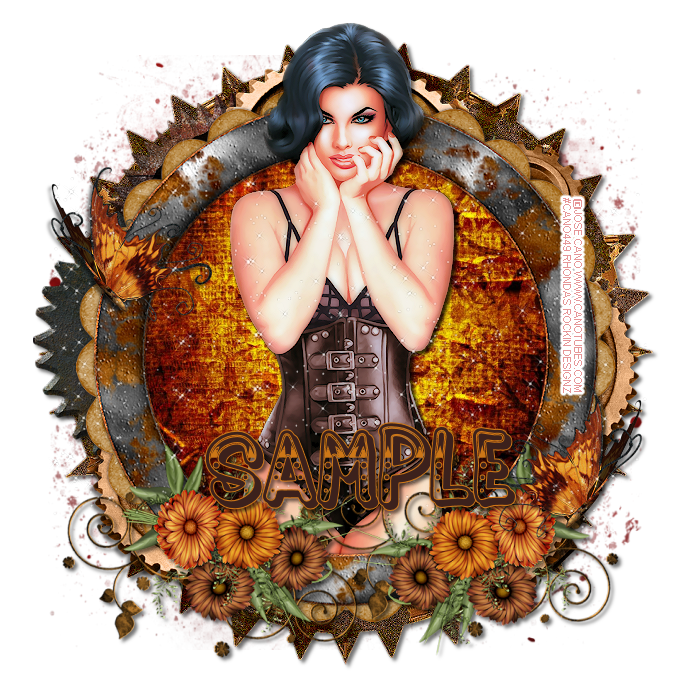
This tutorial is written for those with knowledge of PSP
Supplies Needed:
Tube of choice: I'm using the wonderful art work of Jose Cano
You must obtain a license to use his tubes HERE
Matching PTU Scrapkit by Designs by Vi HERE
Kit and tube can be purchased together at store
Mask of choice
Ok lets get started:
This is a very quick and easy tutorial
Open blank canvas 700x700
Open frame 1 and place in center
Open frame 3 and place on top
Grab the magic wand & click inside top frame
Selections modify expand by 10
Add new layer under frame
Open paper 11 & paste into selection
Select none
Place your tube & build around it
Now time to add our elements
I used the following:
Element 2
Element 10
Element 12
Element 16
Element 31
Element 41
Element 42
Element 58
Element 61
Merge your layers
Open paper of choice & apply mask
Place your name where you like it
Add the Copyright and your License Number for the tube
Resize to your liking and save as PNG
This tutorial was created on May 21,2017 by Rhonda

Subscribe to:
Posts
(Atom)
Grab My Blinkie

I CT For



Blogs I Visit
























