Tuesday, December 31, 2013

Supplies Needed:
Tube of choice: Im using the wonderful art work of Alex Prihdko
You must obtain a license to use his art at PFD HERE
PTU ScrapKit by CandyCata called "Happy New Year"
You an purchase this awesome kit at Pimp My Tags With Scraps HERE
New Years Template #2 by Brutal Designs HERE
Mask #156 by Vaybs HERE
Xero Radiance
Eyecandy Gradient Glow
Open template - Shift D to duplicate then close out original
Resize template 85% all layers
Canvas size 700x700
delete copyright,layers 6,8,copy of 8 and 11
paste a paper of choice from the kit - I used paper19
selection invert delete
select none delete the original
paste a paper of choice from the kit - I used paper1
selection invert delete
select none delete the original
paste a paper of choice from the kit - I used paper11
selection invert delete
select none delete the original
paste a paper of choice from the kit - I used paper14
selection invert delete
select none delete the original
paste a paper of choice from the kit - I used paper17
selection invert delete
select none delete the original
paste a paper of choice from the kit - I used paper12
selection invert delete
select none delete the original
paste a paper of choice from the kit - I used paper13
selection invert delete
select none delete the original
paste a paper of choice from the kit - I used paper15
selection invert delete
select none delete the original
paste a paper of choice from the kit - I used paper9
selection invert delete
select none delete the original
apply Eyecandy Gradient Glow
place where desired
Xero Radiance with settings of choice
I used the following:
Balloon 3 HNY
Cake
Champagne Bottle Black Open
Champagne Glass Green
Clock
Firework 6
Frame 11
New Years Decoration 1&2
Sparkles 2
Open paper 6 & apply mask
Add the Copyright and your License Number for the tube
Resize to your liking and save as PNG
This tutorial was created on December 31,2013 by Rhonda
Any resemblance to another Tag or Tutorial is purely coincidental

Thursday, December 26, 2013

Supplies Needed:
Tube of choice: Im using the wonderful art work of VeryMany
You must obtain a license to use there art HERE
PTU Scrap Kit by Laura from Tiny Turtle Design called "2014"
You an purchase this awesome kit at her store HERE
Xero Radiance
Open blank canvas 700x700
Open element 158 and place in center of canvas
Grab the magic wand and click inside frame
Selections modify expand by 5
Open Paper 14 & paste as new layer
Selections invert delete
Move paper under frame
Place tube in center of frame
Apply Xero Radiance with settings of choice
I used:
Element 3
Element 8
Element 10
Element 17
Element 18
Element 32
Element 33
Element 35
Element 57
Element 58
Element 59
Add the Copyright and your License Number for the tube
Resize to your liking and save as PNG
This tutorial was created on December 26,2013 by Rhonda
Any resemblance to another Tag or Tutorial is purely coincidental
Wednesday, December 25, 2013

Supplies Needed:
Tube of choice: Im using the wonderful art work of Scott Blair
This tube was purchased when he was at MPT which has closed
I'm not usre where he is selling his art but his homepage is HERE
FTU Scrap Kit by Jen from Sweet Temptations called "Wishing for a White Christmas"
You can download this awesome kit HERE
Template #2 by Flaminsal HERE
Don't forget to leave a thank you when downloading
Xero Radiance
Eyecandy Gradient Glow
Open template - Shift D to duplicate then close out original
delete copyright,left & right red circles & dotted circles
paste a paper of choice from the kit - I used paper9
selection invert delete
select none delete the original
paste a paper of choice from the kit - I used paper3
selection invert delete
select none delete the original
paste a paper of choice from the kit - I used paper10
selection invert delete
select none delete the original
paste a paper of choice from the kit - I used paper6
selection invert delete
select none delete the original
paste a paper of choice from the kit - I used paper2
selection invert delete
select none delete the original
add new layer & flood fill with white
apply noise with settings of choice
select none delete the original
apply Eyecandy Gradient Glow
Xero Radiance with settings of choice
I used the following:
Bag
Bag 3
Gift 1-4
Ornament 1&3
Ornaments 2
Snowman
Tree 2
Wreath
Add the Copyright and your License Number for the tube
Resize to your liking and save as PNG
This tutorial was created on December 25, 2013 by Rhonda
Any resemblance to another Tag or Tutorial is purely coincidental

Supplies Needed:
Tube of choice: Im using the wonderful art work of Zebrush
Which you must obtain a license to use at Pic for Design HERE
PTU Scrap Kit by Jen from Sweet Temptations called "Tonights the Night"
You an purchase this awesome kit HERE
Template by Janice from Jus Graphicx HERE
It's the bottom template
Don't forget to leave a thank you when downloading
Plugins Used:
Xero Radiance
Open template - Shift D to duplicate then close out original
Canvas size 725x700
delete copyright
paste a paper of choice from the kit - I used paper5
selection invert delete
select none delete the original
paste a paper of choice from the kit - I used paper6
selection invert delete
select none delete the original
paste a paper of choice from the kit - I used paper8
selection invert delete
select none delete the original
paste a paper of choice from the kit - I used paper1
selection invert delete
select none delete the original
paste a paper of choice from the kit - I used paper7
selection invert delete
select none delete the original
paste a paper of choice from the kit - I used paper4
selection invert delete
select none delete the original
paste a paper of choice from the kit - I used paper10
selection invert delete
select none delete the original
paste a paper of choice from the kit - I used paper9
selection invert delete
select none delete the original
Xero Radiance with settings of choice
I used the following:
Balloon 1&2
Bucket
Corsage
Cupcake 1&2
Decor1
Drink
Fireworks 1&2
Wand
Add the Copyright and your License Number for the tube
Resize to your liking and save as PNG
This tutorial was created on January 4, 2013 by Rhonda
Any resemblance to another Tag or Tutorial is purely coincidental
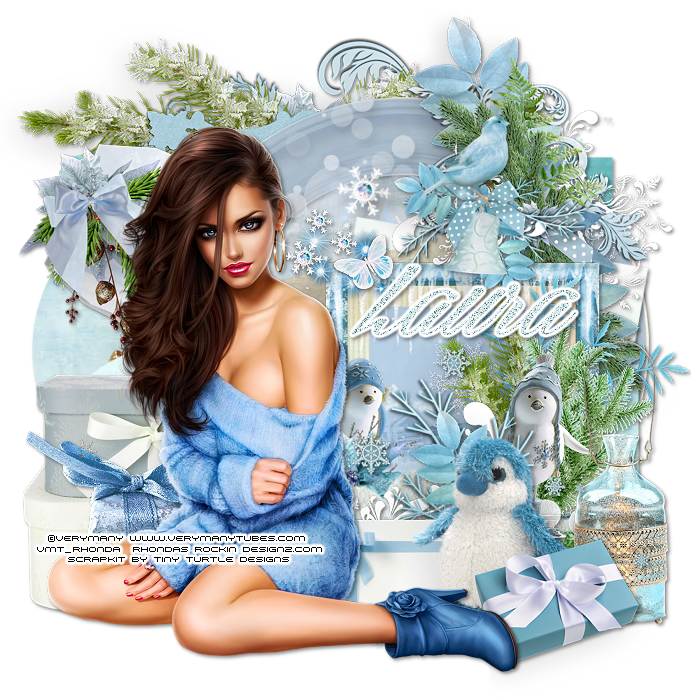
Supplies Needed:
Tube of choice: Im using the wonderful art work of VeryMany
You can purchase their tubes HERE
PTU Scrap Kit by Laura from Tiny Turtle Design called "Winter Ice"
You an purchase this awesome kit at her store HERE
Template #2 by TwytzedT's Playroom HERE
Xero Radiance
Open template - Shift D to duplicate then close out original
Resize all layers 90%
Canvas size 700x700
Delete copyright,stars & dotted lines
paste a paper of choice from the kit - I used paper11
selection invert delete
select none delete the original
paste a paper of choice from the kit - I used paper20
selection invert delete
select none delete the original
paste a paper of choice from the kit - I used paper2
selection invert delete
select none delete the original
paste a paper of choice from the kit - I used paper37
selection invert delete
select none delete the original
paste a paper of choice from the kit - I used paper12
selection invert delete
select none delete the original
paste a paper of choice from the kit - I used paper16
selection invert delete
select none delete the original
paste a paper of choice from the kit - I used paper24
selection invert delete
select none delete the original
paste a paper of choice from the kit - I used paper38
selection invert delete
select none delete the original
paste a paper of choice from the kit - I used paper6
selection invert delete
select none delete the original
Add Xero Radiance with settings of choice
I used the following:
Element 17
Element 20
Element 21
Element 25
Element 33
Element 47
Element 49
Element 51
Element 52
Element 109
Element 110
Element 115
Merge your layers
Place your name where you like it
Add the Copyright and your License Number for the tube
Resize to your liking and save as PNG
This tutorial was created on December 25,2013 by Rhonda
Any resemblance to another Tag or Tutorial is purely coincidental

Supplies Needed:
Tube of choice: I'm using the wonderful art work of Keith Garvey
This tube was purchased at PTE which has closed
You can purchase these tubes at his store HERE
FTU Cluster Items at Mago74 HERE
Scroll down to find the clusters
Mask #157 by Vaybs HERE
Don't forget to leave a thank you when downloading
Open blank canvas size 700x700
Open element 2 & resize 22%
Paste cluster in center of canvas
Place tube in center of frame
Open element 7 - resize 17% and place to left of frame
Mirror this element
Open element 1 - resize 12% & paste behind frame on right hand side
Open element 6 - resize 14% & place to top of left frame
Using the deform tool rotate the bow a little to the left
Open new layer and flood fill with color#94121A
Apply noise with Gaussian 65
Open mask and apply
Add the Copyright and your License Number for the tube
Resize to your liking and save as PNG
This tutorial was created on December 14,2013 by Rhonda
Any resemblance to another Tag or Tutorial is purely coincidental

Supplies Needed:
Tube of choice: Im using the wonderful art work of Elias Chatzoudis
This tube was a Christmas Gift from PTE which has closed
You can purchase his tubes at his store HERE
FTU Scrap Kit by Gimptastic Scraps HERE
FTU Cluster frame by Gimptastic Scraps HERE
Mask of choice
Don't forget to leave a thank you when downloading
Xero Radiance
Open cluster frame - Shift D to duplicate & close original
Canvas size 700x700
Grab freehand tool and draw around frame
Selections modify expand by 3
Open paper 8 and place as new layer
Selections invert delete
Move paper under frame
Open frame 1 from kit and place behind cluster
Resize 110% & position where desired
Erase any parts not wanted at bottom
Open lights and place on top of paper in cluster
Erase parts outide frame
Place tube in frame to right
Apply Xero Radiance with settings of choice
Open sign - resize 78% - place to far right of tag
Open snowman - resize 65% - place beside sign
Open leaves - resize 40% - place behind smowman
Open holly - resize 42% - place to the top between wording to right on cluster
Create new layer under tag
Selections select all on new layer
Open paper 5 & paste into selection
Apply mask of choice
Add the Copyright and your License Number for the tube
Resize to your liking and save as PNG
This tutorial was created on November 30,2013 by Rhonda
Any resemblance to another Tag or Tutorial is purely coincidental
Tuesday, December 24, 2013

Supplies Needed:
Tube of choice: Im using the wonderful art work of Keith Garvey
You can purchase his work at his store HERE
FTU Scrap Kit by Clarez Creationz HERE
Template #155 by Millie HERE
Don't forget to leave a thank you when downloading
Xero Radiance
Penta Color Dot
PhotEffex Scanlines
Xero Fritillary
Filters Unliminted Fine Cotton Paper
Open template - Shift D to duplicate then close out original
Canvas 700x700
Deleted copyright & 2013 numbers
apply Xero Fritillary with setings of choice
paste a paper of choice from the kit - I used paper11
selection invert delete
select none delete the original
apply Penta Color Dot with settings of choice
paste a paper of choice from the kit - I used paper7
selection invert delete
select none delete the original
apply Filters Unliminted Fine Cotton Paper
paste a paper of choice from the kit - I used paper8
selection invert delete
select none delete the original
apply PhotoEffex Scanlines with settings of choice
apply Eyecandy Gradient Glow
Xero Radiance with settings of choice
I used the following:
2014
Ball
Bubbles
Discoball 2
Fireworks
Glasses
Hats 1&2
Poppers 1
Star
Streamer 1&2
Add the Copyright and your License Number for the tube
Resize to your liking and save as PNG
This tutorial was created on December 24,2013 by Rhonda
Any resemblance to another Tag or Tutorial is purely coincidental
Sunday, December 8, 2013
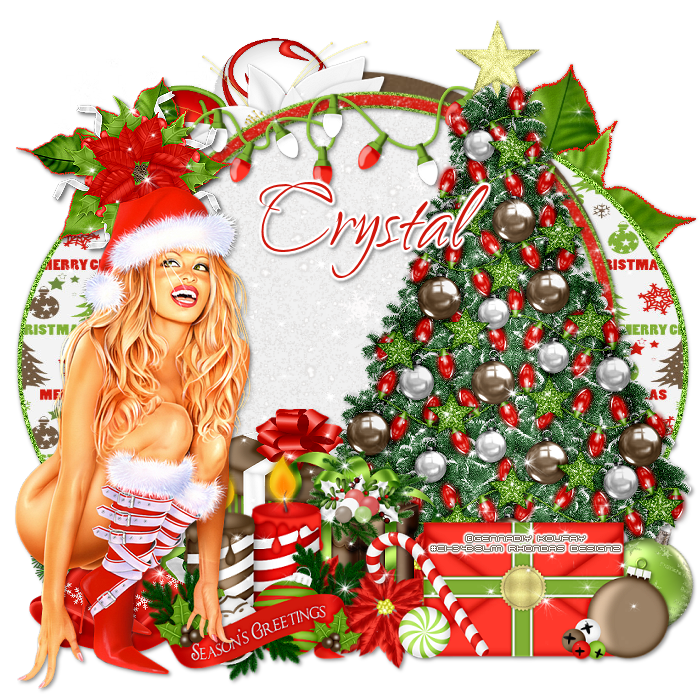
Supplies Needed:
Tube of choice: Im using the wonderful art work of Gennadiy Koufay
This tube was purchased at CILM which has closed
I'm not sure where she is selling at but her site is HERE
PTU Scrap Collab Kit by Crystal from Crystals Creations called "Holly Jolly Christmas"
You an purchase this awesome kit at Pimp My Tags With Scraps HERE
Template #299 by Missy HERE
Xero Radiance
Open template - Shift D to duplicate then close out original
Resize template 115% all layers checked
Canvas size 700x700
delete copyright,wordart,frame,frame background & rectangle
paste a paper of choice from the kit - I used paper3
selection invert delete
select none delete the original
add noise with settings of choice
paste a paper of choice from the kit - I used paper6
selection invert delete
select none delete the original
paste a paper of choice from the kit - I used paper4
selection invert delete
select none delete the original
paste a paper of choice from the kit - I used paper2
selection invert delete
select none delete the original
Xero Radiance with settings of choice
Element 1
Element 3
Element 4
Element 5
Element 8
Element 15
Element 17
Element 18
Element 21
Element 23
Element 27
Element 29
Element 31
Element 33
Element 37
Element 39
Add the Copyright and your License Number for the tube
Resize to your liking and save as PNG
This tutorial was created on December 7,2013 by Rhonda
Any resemblance to another Tag or Tutorial is purely coincidental
Friday, December 6, 2013

Supplies Needed:
Tube of choice: Im using the wonderful art work of Keith Gravey
You must obtain a license to use his art HERE
PTU Scrapkit Collab Mix & Match - I used the kit from Designs by Sarah called "Santas Naughty Helper"
You an purchase this awesome kit at Pimp My Tags With Scraps HERE
Mask #362 by Weescotslass Creations HERE
Xero Radiance
Open frame 5 and paste as new layer
Rotate frame 90 degrees to right
Click inside frame with magic wand
Selections modify expand by 5
Open mattie 3 and paste as new layer
Selections invert delete
Move paper under frame
Xero Radiance with settings of choice
I used the following:
Bow 3
Brad 1
Branch 1
Flower 1&2
Frame 4
Ribbon 3&5
Tree 1
Wordart 3
Open paper 1 & apply mask of choice
Add the Copyright and your License Number for the tube
Resize to your liking and save as PNG
This tutorial was created on December 6,2013 by Rhonda
Any resemblance to another Tag or Tutorial is purely coincidental
Subscribe to:
Posts
(Atom)
Grab My Blinkie

I CT For



Blogs I Visit
























