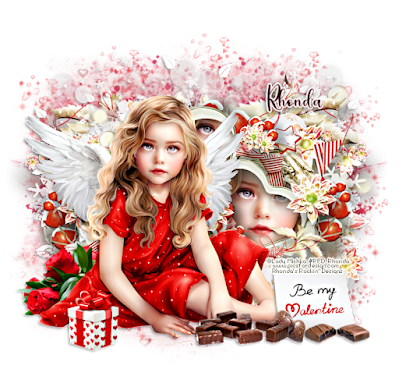
Ok Let's get Started:Open canvas 725x725Open element 10 from supplies and paste to canvasResize and move to right sideOpen tube of choice and paste to left sideI added parts of face into heart shapes on clusterOpen clusters 42,46,51 and 52 behind main clusterUse my tag as an example - resize if neededOpen other tubes and place on tag
Make sure to sharpen tubes after resize and drop shadow of choice
I keep all my layers open to use later if neededOpen paper of choice and add to canvasUse any masks of choice
Place your name where you like itAdd the Copyright and your License Number for the tubeResize to your liking and save as PNGThis tutorial was created on January 20,2024 by RhondaAny resemblance to another Tag or Tutorial is purely coincidental
This tutorial is written for those with knowledge of PSPSupplies Needed:A1 FTU kit & tube by April's Snagables "Be My Valentine"Kit and tube can be downloaded from her blog HEREBe sure to look at all April's graphics!!!Mask of choice
Ok Let's get Started:Open canvas 725x725Open frame 9, resize and place to left side of canvasOpen element 14, place to right side of frameOpen element 11, place to left in front of frameOpen element 32, place to right side of canvasOpen element 30, place to left side of canvasOpen element 29, place to right side of canvasOpen tube of choice and place where you want on tagI used tube element 49I used all cupcake elements and placed to left of canvas
I left all my layers openOpen paper of choice and apply mask of choice
Place your name where you like itAdd the Copyright and your License Number for the tubeResize to your liking and save as PNGThis tutorial was created on January 20,2024 by RhondaAny resemblance to another Tag or Tutorial is purely coincidental
Hope everyone is having a great 2024!!!Hard to believe last year went by so fast.It was a horrible year for me so not complaining.Ready to see what 2024 has for me.
I'm planning on creating more graphics and pushingmy boundaries in PSP.I want to learn how to create masks, templates,more cluster frames and other small designs Ihave seen on the internet.I will still be writing tutorials, but I want to changethat style as well. So be patient as I take these steps along the way.Thank you to everyone who has supported me.I appreciate you more than you know!!!!
Quick and easy tutorial!!!This tutorial is written for those with knowledge of PSPSupplies Needed:Tube of choice: I'm using the wonderful artwork of VeryManyTube can purchased at VMT HEREPTU kit by Kathy's PSP Designs called FallingKit can be purchased at PFD HERECheck out Kathy's blog for more freebies and goodies HEREMask of choiceWordArt of choice
Ok, let's get started:I have supplied 2 clusters I created belowChoose the one you preferAdd elements of your choice if neededOpen tube of choice and place on canvasApply mask and WA if needed
Place your name where you like itAdd the Copyright and your License Number for the tubeResize to your liking and save as PNGThis tutorial was created on January 12,2024 by RhondaAny resemblance to another Tag or Tutorial is purely coincidental
TTL hosted a Santa Approved blog train!!!!TY to all our wonderful members who took partTrain will depart the station on December 10Remember we are on different time zones If site not posted, come back laterEnjoy your ride and have a blessed Holiday season
Train Headquaters - HEREShelly - HEREJen - HERERhonda -HEREAnorie - HERELavada - HERE
I created 3 clusters and embellishment fromthese awesome kits.
This tutorial is written for those with knowledge of PSPSupplies Needed:Tube of choice: I'm using the wonderful artwork of KajennaTube purchased at PFD HEREFTU Kit by MizTeeques called Letter to Santa HERECheck out all the great freebies!!!!!!!!!!Mask #2 by Shelly at EFRB HEREWA of choice
Ok let's get started:Open blank canvas 725x725Open element 65, resize & place to centerOpen tube of choice & paste on tag
Use any elements of choice. I used the following:Element 4Element 5Element 9Element 19Element 23Element 35Element 45Element 48Element 55Element 60Element 66Element 67Element 1
Merge layers or keep layers open to use laterOpen paper of choice and apply mask
Place your name where you like itAdd the Copyright and your License Number for the tubeResize to your liking and save as PNGThis tutorial was created on November 19,2023 by RhondaAny resemblance to another Tag or Tutorial is purely coincidental

**Always remember to resharpen tubes after resizing, rotatingI may not post in tutorial thinking you are awareAnything that distorts image needs to be sharpenedAlso drop shadow each element, tube, image**
Ok let's get started:Open blank canvas 725x725Open element 105, resize and place to canvas near bottomOpen element 107, resize and place to canvas near topOpem element 124, resize, rotate 90 to right and place to left side of canvasClick inside with magic wand and expand by 10Open paper of choice, I used pp18, add as new layer under frameSelections delete. I then rotated my frame a little to left with deform toolOpen element 110, resize and place to canvas near top of frameLayers duplicate, image mirrorOpen element 119, resize and paste near top to right sideOpen element 121, resize and paste to center, moving slightly to leftOpen tube of choice & paste on tag
Use any elements of choice. I used the following:Element 2Element 4Element 16Element 24Element 25Element 27Element 34Element 39Element 41Element 42 (rotate)Element 47Element 57Element 71Element 72Element 102Element 115Element 116Element 118
Open paper of choice and apply maskMerge layers or keep layers open to use later
Place your name where you like itAdd the Copyright and your License Number for the tubeResize to your liking and save as PNGThis tutorial was created on November 16,2023 by RhondaAny resemblance to another Tag or Tutorial is purely coincidental
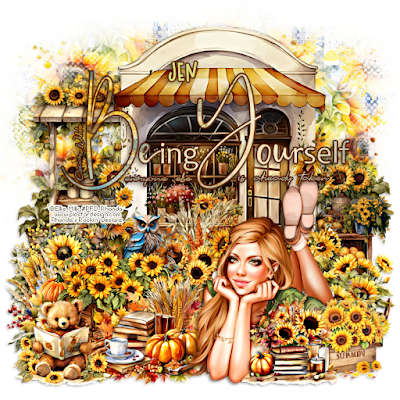
This tutorial is written for those with knowledge of PSPSupplies Needed:Tube of choice: I'm using the wonderful artwork of Ellie_MilkExclusive tube purchased at PFD HEREPTU kit by Jen from Jen's Sweet Temptations called Sunflower PowerKit can be purchased HERE.All kits 50% off at time of this postingMask of choiceWA of choice
Ok let's get started:Open blank canvas 725x725Open element 94 and place to center, resize if you choose.Open element 12 and place to left side behind element 94 near topOpen element 14 and place to right side behind element 94 near bottomOpen tube of choice & paste on canvas
Use any elements of choice. I used the following:Element 1Element 4Element 5Element 9Element 19Element 20Element 29Element 50Element 51Element 62Element 69Element 82Element 89Element 90
Merge layers or keep layers open to use laterOpen paper of choice and apply mask
Place your name where you like itAdd the Copyright and your License Number for the tubeResize to your liking and save as PNGThis tutorial was created on November 15,2023 by RhondaAny resemblance to another Tag or Tutorial is purely coincidental
This tutorial is written for those with knowledge of PSPSupplies Needed:Tube of choice: I'm using the wonderful artwork of Elias ChatzoudisTube was purchased at CDO HEREPTU kit by Jens Sweet Temptations called Turkey DayKit can be purchased at her store HEREJen is having a 50% off sale at time of this postingMask #66 from Moonbeams & Spiderwebs HERECheck out rest of the goodies offered on blog
Ok let's get started:Open blank canvas 725x725Open element 20 & place to center close to top Open tube of choice and place to left hand side
Use any elements from kit to complete your tagI used the following:Element 4Element 5Element 7Element 9Element 10Element 12Element 14Element 23Element 24Element 26Element 27Element 29Element 30Element 36Element 48Element 55Element 61
Open paper of choice & apply mask I leave all my layers open for future use
Place your name where you like itAdd the Copyright and your License Number for the tubeResize to your liking and save as PNGThis tutorial was created on November 12,2023 by RhondaAny resemblance to another Tag or Tutorial is purely coincidental
This tutorial is written for those with knowledge of PSPSupplies Needed:Tube of choice: I'm using the wonderful artwork of Fiodorava_MariaExclusive tube purchased at PFD HEREFTU Kit by My Tagging Addiction HERECheck out all Linda's freebies!!!!!!!!!!Mask #5 by Wendez Watermark HERELast post on page - First set of zipsCheck out the other masks and all freebies
Ok let's get started:Open blank canvas 725x725Open frame 5, resizeClick inside with magic wand & expand by 6 (keep selected)Open new layer under frameOpen paper and paste into selection (deselect)Open element 11 and resize 40%Place behind original frameUsing Mura Meister Encircle filter, create a cluster in backUse setting of your choiceOpen tube of choice & paste on tag
Use any elements of choice. I used the following:Element 1Element 2Element 4Element 5Element 9Element 12Element 15Element 17Element 19Element 20Element 23Element 31Element 32Element 33
Merge layers or keep layers open to use laterOpen paper of choice and apply mask
Place your name where you like itAdd the Copyright and your License Number for the tubeResize to your liking and save as PNGThis tutorial was created on November 8,2023 by RhondaAny resemblance to another Tag or Tutorial is purely coincidental





























